Date & time
Navigation: Configuration > General settings > Date & time
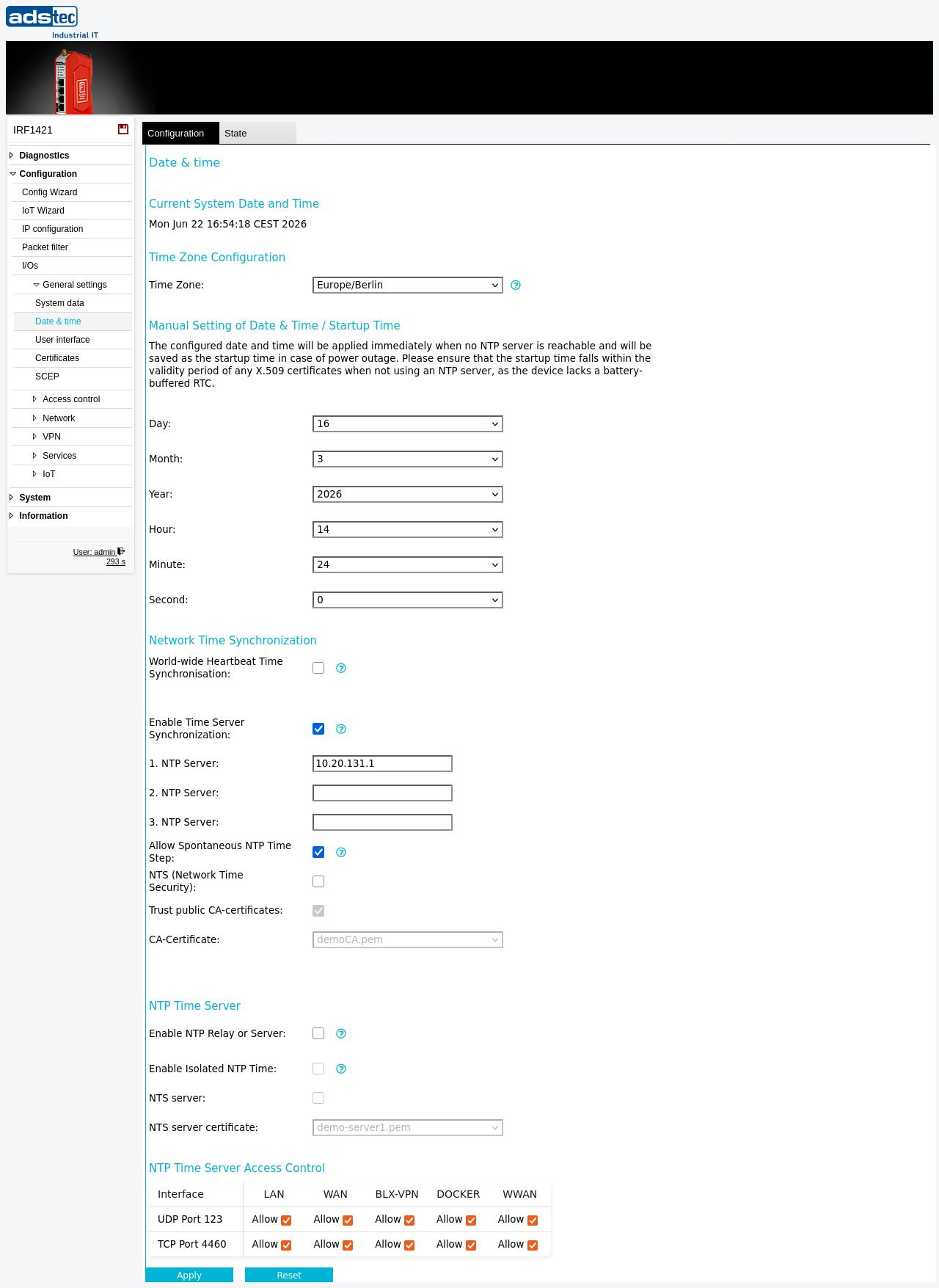
The Date & time page configures the system clock of the IRF1000, including the timezone, manual time setting, and automatic time synchronization via the Network Time Protocol (NTP). Accurate time is essential for correct log timestamps, certificate validation, scheduled tasks configured on the Scheduler page, and time-sensitive security protocols. The device can synchronize its clock from up to three external NTP servers and optionally act as an NTP time server for clients on the local network. If the device is connected to the Big-LinX cloud, time can also be synchronized from the Big-LinX server. Network Time Security (NTS) is supported for authenticated and encrypted NTP communication. Changes take effect immediately after clicking Apply settings, but must be saved persistently via the Save page to survive a reboot.
Prerequisites
- If NTP synchronization is used, the configured NTP servers must be reachable from the device. Ensure that the Packet filter permits outgoing NTP traffic (UDP port 123) on the appropriate interface.
- If NTS is to be used, the NTP server must support the NTS protocol (TCP port 4460) and the required CA certificates must be installed on the device via the Certificates page, or the Trust public CA certificates option must be enabled.
- If Big-LinX time synchronization is used, the Big-LinX VPN connection must be configured and operational (see Big-LinX).
Settings
Time Zone Configuration
- Time Zone
- Selects the timezone for the device. This setting applies to both manual time and NTP-synchronized time. All timestamps in the Eventlog, Audit log, and other system logs are displayed in the configured timezone.
ATTENTION
After changing the timezone it is recommended to restart the system so that all services apply the new timezone consistently.
Manual Setting of Date & Time
The manually configured date and time are applied immediately when no NTP server is reachable. When NTP is enabled, the manual time is overwritten as soon as the device synchronizes with an NTP server. Note that the device does not have a battery-backed real-time clock, so the system time may be inaccurate after a power interruption until NTP synchronization completes or the time is set manually.
- Day
- Day of the month (01--31).
- Month
- Month (01--12).
- Year
- Four-digit year.
- Hour
- Hour in 24-hour format (00--23).
- Minute
- Minute (00--59).
- Second
- Second (00--59).
Network Time Synchronization
- World wide heartbeat Time Synchronization
- When enabled, sets the local time if it differs from the Big-LinX server time by more than 60 seconds. This option is useful as a secondary time source when the device is connected to the Big-LinX cloud but may not have direct access to public NTP servers.
- Enable Time Server Synchronization
- Enables or disables automatic clock synchronization via the Network Time Protocol (NTP). When enabled, the local clock is synchronized to the clock of the first reachable NTP server. When disabled, the date and time must be set manually.
-
- NTP Server
- Hostname or IP address of the primary NTP server. The device attempts to synchronize with this server first.
-
- NTP Server
- Hostname or IP address of a secondary NTP server. Used if the primary server is unreachable.
-
- NTP Server
- Hostname or IP address of a tertiary NTP server. Used if both the primary and secondary servers are unreachable.
- Allow Spontaneous NTP Time Steps
- When enabled, allows large spontaneous time corrections from an NTP source during device runtime. When disabled, large time steps are only performed immediately after device startup to initially synchronize the time and date. Connected NTP clients or other software may be disrupted by such time jumps during normal operation.
- NTS (Network Time Security)
- Enables NTS for authenticated and encrypted communication with NTP servers. When NTS is active, the device verifies the identity of the NTP server using TLS certificates, protecting against man-in-the-middle attacks on time synchronization.
- Trust public CA certificates
- When enabled, the device uses publicly trusted CA certificates to validate NTS server certificates. Disable this option if you want to restrict trust exclusively to CA certificates uploaded via the Certificates page.
- CA Certificate
- Selects a specific CA certificate from the certificates installed on the device for validating NTS server certificates. This allows restricting trust to a particular certificate authority rather than relying on the full set of installed or public CA certificates.
NTP Time Server
- Enable NTP Relay or Server
- When enabled, an NTPv4 time server service is activated on the device. The time source used for the NTP server depends on the other time synchronization options configured above (NTP client synchronization, Big-LinX time sync, or manual time).
- Enable Isolated NTP Time
- This option can be enabled if the device time is to be provided as NTP time in a local network without an external time source. It activates a stratum value of 10, so that clients will only use this device's time if no other NTP server with a lower stratum is available. Note that the device does not have a battery-backed real-time clock, so the time may become inaccurate if the device loses power for an extended period.
- NTP Server
- Hostname or IP address of the NTP server certificate endpoint, if required for NTS-secured relay operation.
- NTP Server Certificate
- Selects a server certificate from the certificates installed on the device. This certificate is presented to NTP clients when NTS is used for the relay service.
NTP Time Server Access Control
This table controls on which interfaces the NTP time server service accepts incoming NTP requests. Each row represents a protocol and port combination, and each column represents a network interface (LAN, WAN, Big-LinX, DOCKER, WWAN). Set each cell to allow or deny to permit or block NTP access on that interface.
- UDP Port 123
- Controls access to the standard NTP service (UDP port 123) on each interface.
- TCP Port 4460
- Controls access to the NTS Key Establishment protocol (TCP port 4460) on each interface. This port is used for the initial TLS handshake of the NTS protocol.
Security
Use NTP with NTS where possible to ensure that time synchronization cannot be manipulated by an attacker. Restrict NTP time server access to only those interfaces where NTP clients require it — deny access on WAN and WWAN interfaces unless external clients must synchronize with this device. If the device operates in an isolated network without access to external NTP servers, enable Isolated NTP Time with caution and be aware that the unsynchronized device clock may drift over time. Disable Allow Spontaneous NTP Time Steps in environments where connected clients or applications are sensitive to sudden time changes.