Docker
Navigation: Configuration > Services > Docker
The Docker page configures the integrated Docker container runtime on the IRF1000. Docker enables you to deploy custom application containers directly on the device, extending its functionality beyond the built-in firewall and routing capabilities. This page controls the activation of the Docker service, TLS-secured remote access to the Docker CLI socket, registry trust settings, network proxy configuration, and peripheral access for containers. The Docker CLI Socket Network Access table at the bottom of the page determines on which interfaces the Docker TCP socket is reachable for remote management. Use the Packet filter page to define additional access restrictions. The Docker network interface itself is configured on the IP configuration page.
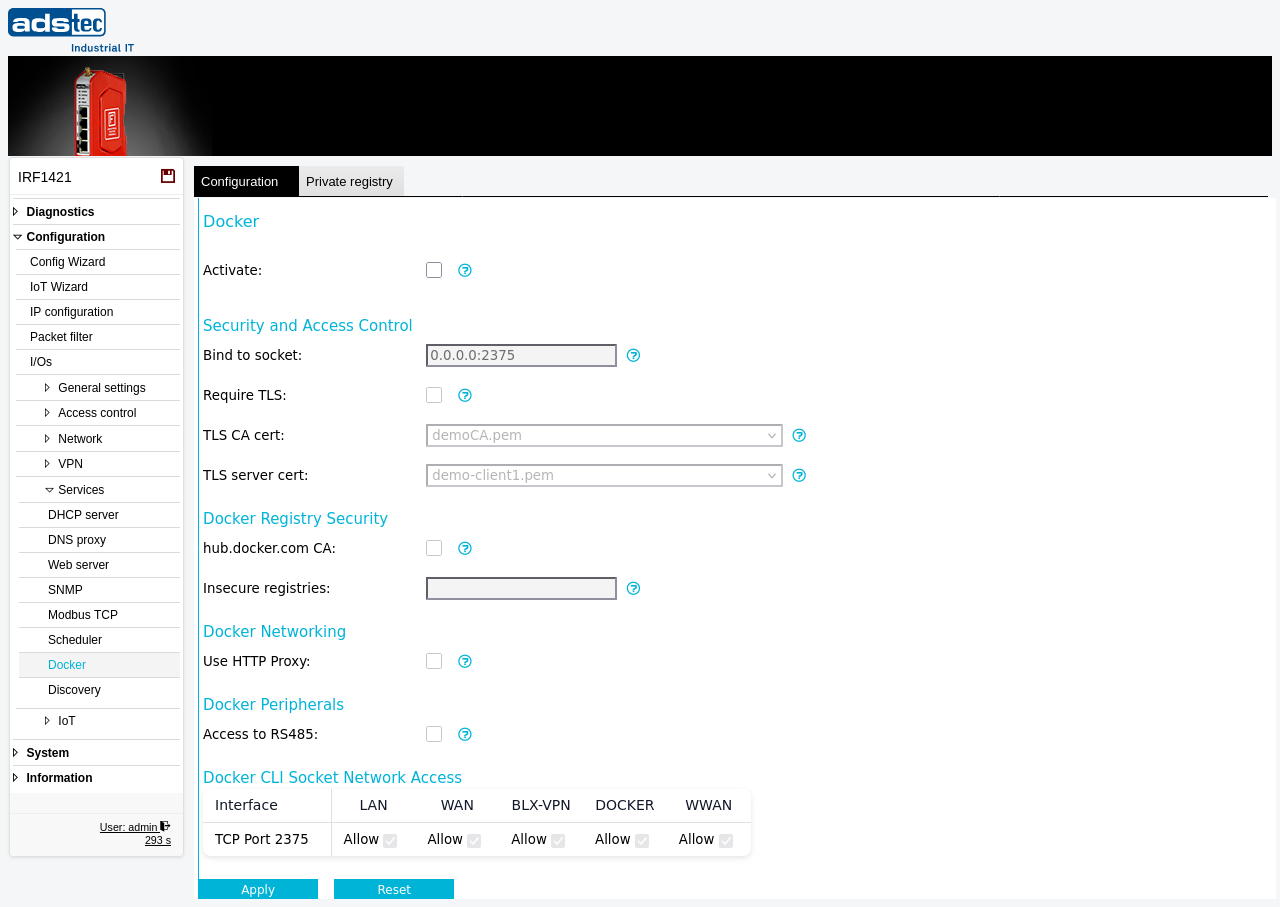
Settings
Docker
- Activate
- Enables the Docker container service on the device. When activated, you can load and run your own Docker containers on the IRF1000. When deactivated, the Docker daemon is stopped and no containers can run.
Security and Access Control
- Bind to socket
- Configures the Docker hosts variable in the format IP address:port. This defines the TCP socket on which the Docker daemon listens for remote CLI connections. An IP address of
0.0.0.0makes the socket available on all network interfaces. To restrict remote access, specify a local IP address of the device instead. - Require TLS
- Activates TLS encryption and authentication for remote access to the Docker CLI socket. When enabled, only clients presenting a valid certificate signed by the configured CA are permitted to connect. It is strongly recommended to enable this option whenever the Docker socket is exposed for remote management.
- TLS CA cert
- Selects the CA certificate used by the Docker CLI TCP socket server. Only clients holding certificates issued by this CA are allowed to connect. Certificates are managed on the Certificates page.
- TLS server cert
- Selects the server certificate used by the Docker CLI TCP socket server for remote access. This certificate is presented to clients during the TLS handshake. Certificates are managed on the Certificates page.
Docker Registry Security
- hub.docker.com CA
- Enables the CA certificates required to pull container images from the public hub.docker.com registry. Disable this option if you want to restrict all pull operations exclusively to your own private Docker registries.
- Insecure registries
- Configures the Docker insecure-registries variable. This allows the device to communicate with a private Docker registry that does not use TLS encryption. Enter the registry address in the format
host:port. This setting is intended for testing environments only.
Docker Networking
- Use HTTP Proxy
- Enables the system-wide HTTP proxy for the Docker daemon. When activated, the Docker daemon routes all communication through the proxy server configured on the HTTP Proxy page. NTLM authentication is not supported.
Docker Peripherals
- Access to RS485
- Grants Docker containers access to the integrated RS-485 serial interface. Enable this option when containers need to communicate with serial field devices such as Modbus RTU slaves connected to the RS-485 port.
Docker CLI Socket Network Access
The access table controls on which network interfaces the Docker CLI TCP socket accepts remote connections. Each interface can be enabled or disabled independently using its checkbox.
LAN: Allows Docker CLI access from the local network.
WAN: Allows Docker CLI access from the wide area network.
BLX-VPN: Allows Docker CLI access through a Big-LinX VPN tunnel.
DOCKER: Allows Docker CLI access from other Docker containers.
WWAN: Allows Docker CLI access from the wireless WAN interface.
ATTENTION
Enabling the Docker CLI socket without TLS exposes the Docker daemon to unauthenticated remote control. Any client that can reach the configured socket can start, stop, and modify containers, and potentially gain full access to the device. Always enable Require TLS and configure proper CA and server certificates before exposing the Docker socket to any network. Do not use insecure registries in production environments — unencrypted registry communication allows image tampering and credential interception.
Security
Restrict Docker CLI socket access to the minimum necessary interfaces using the network access table and the Packet filter. In security-sensitive environments, avoid binding the socket to 0.0.0.0 and instead specify only the local IP address of the interface required for management. Disable the hub.docker.com CA if containers should only be sourced from trusted private registries under your control. Disable the RS-485 peripheral access unless containers specifically require serial communication, to prevent unnecessary exposure of the physical interface. Review deployed containers regularly and remove any that are no longer needed to minimize the attack surface.