Modbus TCP
Navigation: Configuration > Services > Modbus TCP
The Modbus TCP page configures the built-in Modbus TCP server on the IRF1000. When enabled, the device accepts incoming Modbus TCP connections from a SCADA system, PLC, or other Modbus client, allowing external systems to monitor and control various device functions via Modbus registers — for example, establishing or disconnecting VPN connections. The server supports only one concurrent client connection. Access can be restricted by IP address filter and protected with a hexadecimal password. The Modbus TCP service listens on a configurable port (default: 502) and should be used in conjunction with the Packet filter to control which network segments are permitted to reach the service.
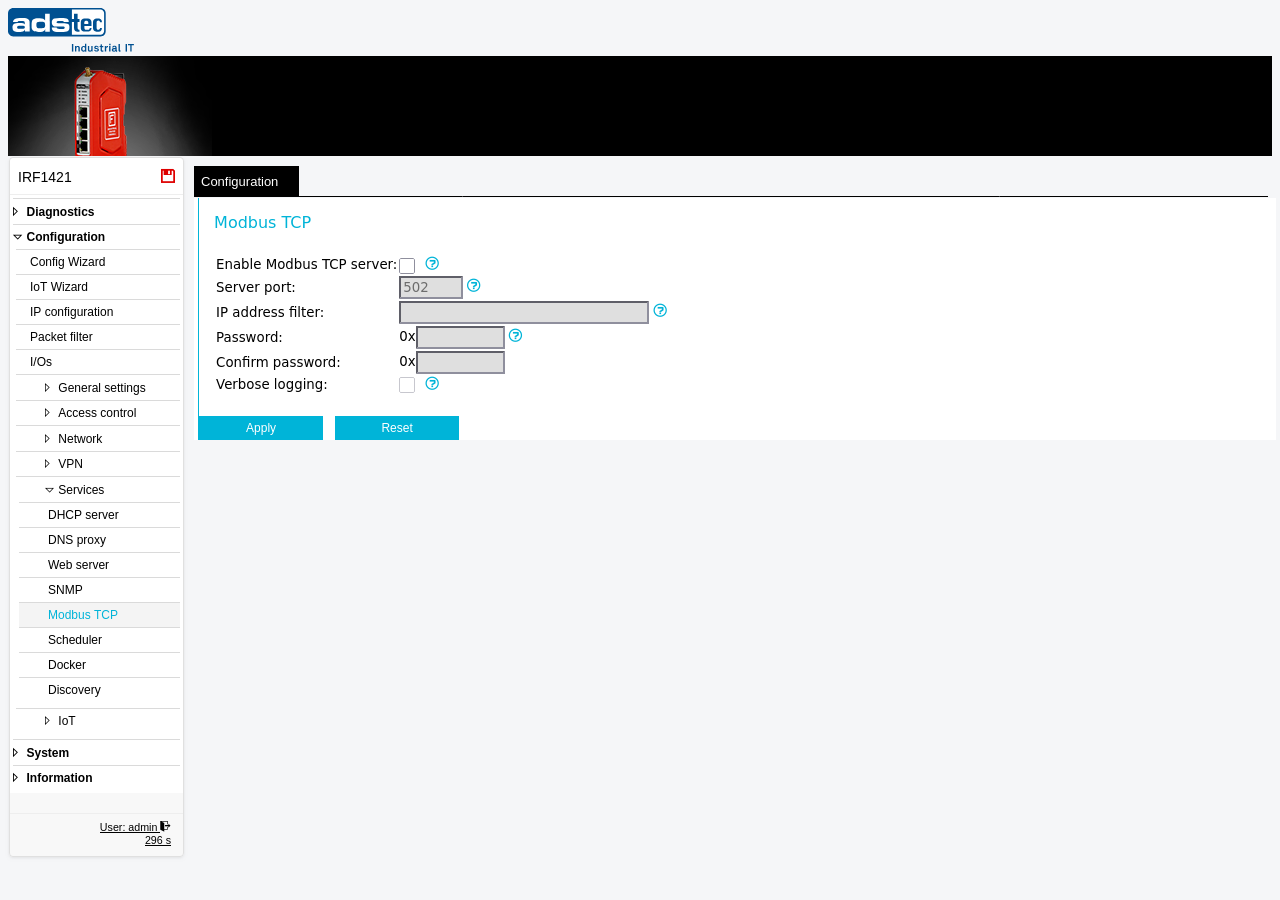
Settings
- Enable Modbus TCP server
- Activates the Modbus TCP server. When enabled, the device listens for incoming Modbus TCP connections on the configured server port. When disabled, the device does not accept any Modbus TCP requests.
- Server port
- Specifies the TCP port on which the Modbus TCP server listens for incoming requests. If no port is specified, the standard Modbus TCP port 502 is used.
- IP address filter
- Restricts which clients may connect to the Modbus TCP server. Enter an IP address or subnet in CIDR notation (for example,
192.168.0.0/24) to permit only clients from that range. Only one client connection at a time is allowed. If the field is left empty, any client may connect. It is strongly recommended to restrict access to a trusted network segment. - Password
- An optional eight-digit hexadecimal password for Modbus TCP access (for example,
0x1a2b3c4d). The value is entered without the0xprefix — the prefix is displayed automatically. If the password is set (not empty and not zero), a newly connected client must first write the correct high-order (first four digits) and low-order (last four digits) values to the password registers before it is permitted to access any other register. - Confirm password
- Re-enter the hexadecimal password to confirm. This field must match the Password field exactly.
- Verbose logging
- Enables extended logging for the Modbus TCP service. By default, only access violations are logged (such as rejected connections due to IP address filter restrictions or incorrect password attempts). When this option is activated, additional information about connections, requests, and processing time is recorded in the event log. Disable verbose logging during normal operation to reduce log volume.
ATTENTION
The Modbus TCP protocol transmits data unencrypted over the network. Any client with network access to the configured port can attempt to connect. Always configure an IP address filter and set a password to prevent unauthorized access. Do not expose the Modbus TCP port to untrusted networks.
Security
Only enable the Modbus TCP server if it is actively required for device management via Modbus. Restrict access using the IP address filter to the minimum necessary subnet. Set a strong hexadecimal password and combine it with Packet filter rules to limit which hosts can reach the service port. If the Modbus TCP service is no longer needed, disable it to reduce the attack surface. Enable verbose logging only temporarily for troubleshooting, as it records detailed connection information that may be sensitive.