IP configuration
Navigation: Configuration > IP configuration
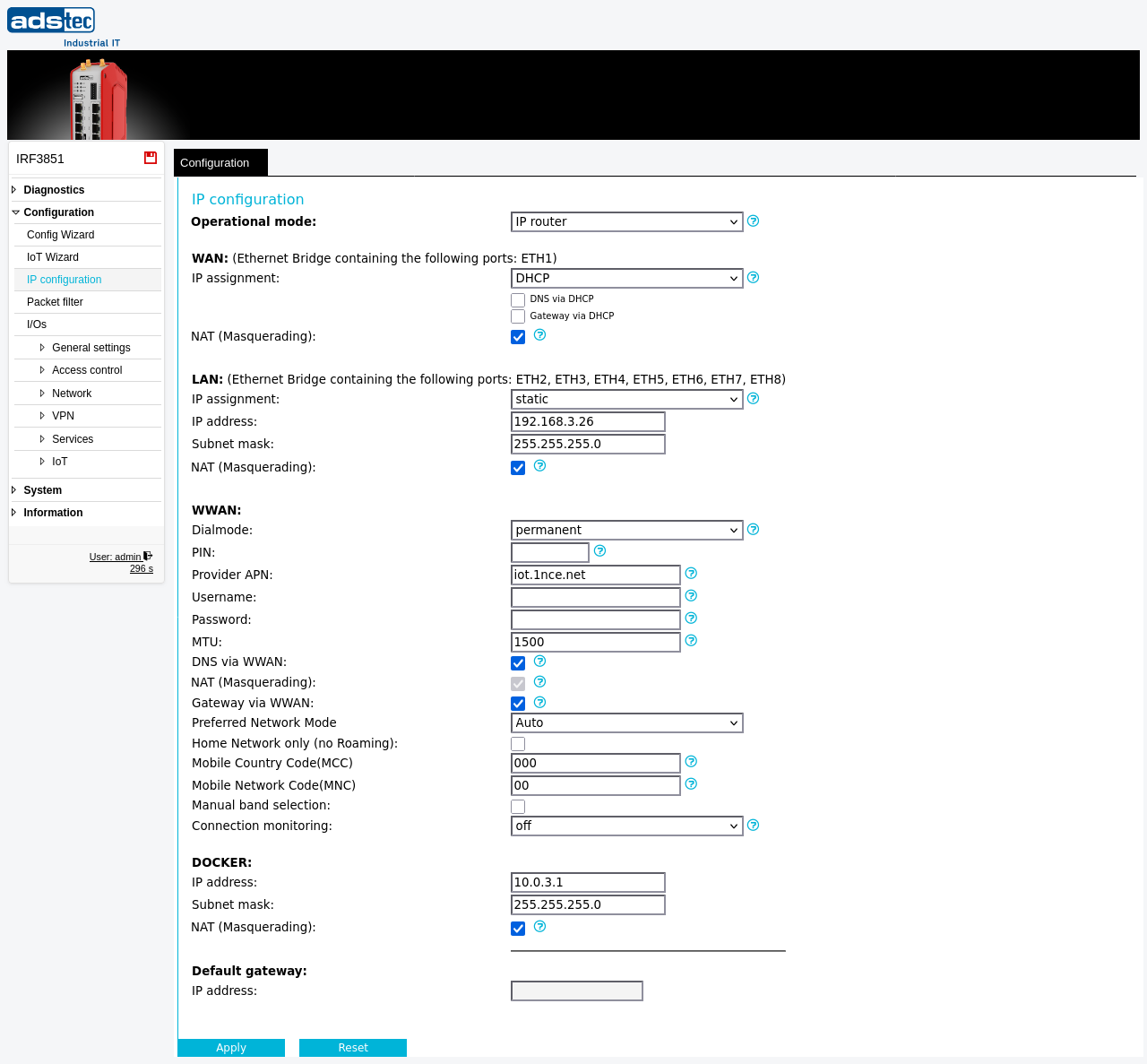
The IP configuration page is the central location for defining how the device communicates on each of its network interfaces. It controls the operational mode of the device — either as a transparent bridge or as an IP router — and allows configuration of IP addresses, subnet masks, gateways, and NAT settings for the WAN, LAN, WWAN (cellular), and Docker interfaces. Settings on this page determine the fundamental network topology and directly affect the behavior of the Packet filter, Forwarding, and IP routing pages. Changes take effect immediately after clicking Apply settings, but must be saved persistently via the Save page to survive a reboot. If a misconfiguration causes loss of connectivity, a power cycle restores the last saved state.
Prerequisites
- Determine whether the device should operate in transparent bridge mode or IP router mode. Switching the operational mode changes the network topology fundamentally.
- When using WWAN, ensure a SIM card is inserted and the PIN, APN, and provider credentials are available.
- If the device is accessed remotely, plan for temporary loss of connectivity when changing IP addresses.
Settings
General
- Operational mode
-
Selects the fundamental network mode of the device.
Transparent bridge: The device operates as a Layer 2 bridge and is invisible to network clients. WAN and LAN share the same IP subnet.
IP router: The device separates WAN and LAN into two independent IP networks. This mode is required for packet filtering, port forwarding, and NAT.
WAN interface
- IP assignment
-
Determines how the WAN interface obtains its IP address.
static: A fixed IP address is configured manually. Additional fields for IP address and subnet mask appear when this option is selected.
DHCP: The IP address is assigned automatically by a DHCP server on the network.
DHCP + fallback: DHCP is attempted first. If no DHCP server responds, a fixed fallback IP address is used.
PPPoE/DHCP: The IP address is assigned dynamically by the provider (typical for DSL connections).
- DNS via DHCP
- When enabled, DNS server settings are obtained automatically from the DHCP server. Available when IP assignment is set to DHCP or DHCP + fallback.
- Gateway via DHCP
- When enabled, the default gateway is obtained automatically from the DHCP server. Available when IP assignment is set to DHCP or DHCP + fallback.
- NAT (Masquerading)
- Enables Network Address Translation on the WAN interface. The source IP address of all outgoing traffic is replaced with the IP address of this interface. Strongly recommended on DSL connections.
LAN interface
- IP assignment
-
Determines how the LAN interface obtains its IP address.
static: A fixed IP address is configured manually. Additional fields for IP address and subnet mask appear when this option is selected.
DHCP: The IP address is assigned automatically by a DHCP server on the network.
DHCP + fallback: DHCP is attempted first. If no DHCP server responds, a fixed fallback IP address is used.
- NAT (Masquerading)
- Enables NAT on the LAN interface. Typically not required unless the LAN side connects to an upstream network that requires address translation.
WWAN (cellular) interface
Note
The WWAN (cellular) settings described in this section are only available on the device models equipped with an optional WWAN modem. These settings do not appear on devices without cellular hardware.
- Dialmode
-
Controls whether and how the cellular modem connection is established.
disabled: The WWAN modem is not used.
manual: The connection can be triggered manually from the WWAN diagnostics page.
permanent: The WWAN link is established automatically on system boot.
fallback: The WWAN link is only activated if monitoring on the specified interface detects a failure. After an outage of at least 30 seconds, the WWAN connection is started. Packet filter rules and forwarding rules defined for IPsec via the original interface also apply to IPsec via the fallback connection.
- PIN
- The personal identification number for the inserted SIM card.
- Provider APN
- The Access Point Name for the mobile provider's packet data service.
- Username
- Username for authentication with the APN (if required by the provider).
- Password
- Password for authentication with the APN (if required by the provider).
- MTU
- Sets the maximum packet size for the cellular connection. Adjustable from 1300 to 1500 bytes; the default is 1500. A lower MTU can help avoid fragmentation and connectivity issues when a VPN tunnel runs over the cellular link.
- DNS via WWAN
- When enabled, DNS server settings are obtained automatically from the mobile provider.
- NAT (Masquerading)
- Enables NAT on the WWAN interface. NAT is always active for the cellular modem.
- Gateway via WWAN
- When a cellular connection is active, it is used as the default gateway. Any previously active default gateway is overridden and restored when the cellular connection is terminated.
- Preferred Network Mode
- Selects the preferred cellular network technology. Set to Auto for automatic selection by the modem.
- Home Network only (no Roaming)
- When enabled, the modem connects only to the home network and does not roam to other providers.
- Mobile Country Code (MCC)
- A 3-digit code identifying the country (e.g., 262 for Germany). Set to 000 for automatic selection.
- Mobile Network Code (MNC)
- A 2-digit code identifying the mobile provider in combination with the MCC. Set to 00 for automatic selection.
- Manual band selection
- When enabled, allows manual selection of the cellular frequency band instead of automatic band selection by the modem.
- Connection monitoring
- Every 20 seconds, two ICMP requests are sent to the specified destination IP address. If these requests are not answered, the WWAN modem is reset. This is required by some providers to maintain a stable cellular connection.
- Fallback for interface
- Specifies which interface the WWAN connection serves as fallback for. Only visible when dialmode is set to fallback. The monitoring address must be reachable via this interface.
- Fallback for host
- The address that is monitored to detect failures. A hostname or IP address can be entered. Appending
:<tcp-port>switches monitoring from ICMP to TCP on the specified port. The monitoring interval is 3 packets every 10 seconds. If a hostname is used, it must be resolvable via WWAN DNS.
Docker interface
- IP address
- The IP address assigned to the Docker bridge interface. Containers on this bridge communicate with the host and external networks via this address.
- Subnet mask
- The subnet mask for the Docker bridge network.
- NAT (Masquerading)
- Enables NAT on the Docker bridge interface. The source address of outgoing container traffic is replaced with the IP address of this interface.
Default gateway
- IP address
- The default gateway IP address used when no other gateway is configured dynamically (e.g., via DHCP or WWAN). Leave empty if the gateway is obtained automatically.
ATTENTION
After entering the SIM card PIN incorrectly three times, the SIM card is blocked until a PUK (Personal Unblocking Key) is entered to set a new PIN. Verify the PIN before applying the configuration.
Security
Enable NAT on all interfaces that connect to untrusted networks to prevent internal IP addresses from being exposed. When using WWAN fallback mode, be aware that packet filter rules and port forwarding rules defined for the primary interface also apply to traffic routed via the cellular fallback — review your rule set to ensure no unintended access paths are opened. Disable the WWAN modem entirely if cellular connectivity is not required, to reduce the attack surface.