Audit
Navigation: Diagnostics > Audit
The Audit page provides a detailed record of security-relevant events on the device. It logs all successful and failed login attempts, configuration changes, system events, packet filter activity, device actions, Big-LinX interactions, and anomaly detections. Use this page to investigate unauthorized access attempts, trace configuration modifications, and support compliance auditing for industrial network environments.
The audit log is implemented as a 40 MB ring buffer. Once the buffer is full, the oldest entries are overwritten. This buffer is shared among all audit message types. Date and time entries may appear inconsistent due to NTP synchronization updates or manual time changes.
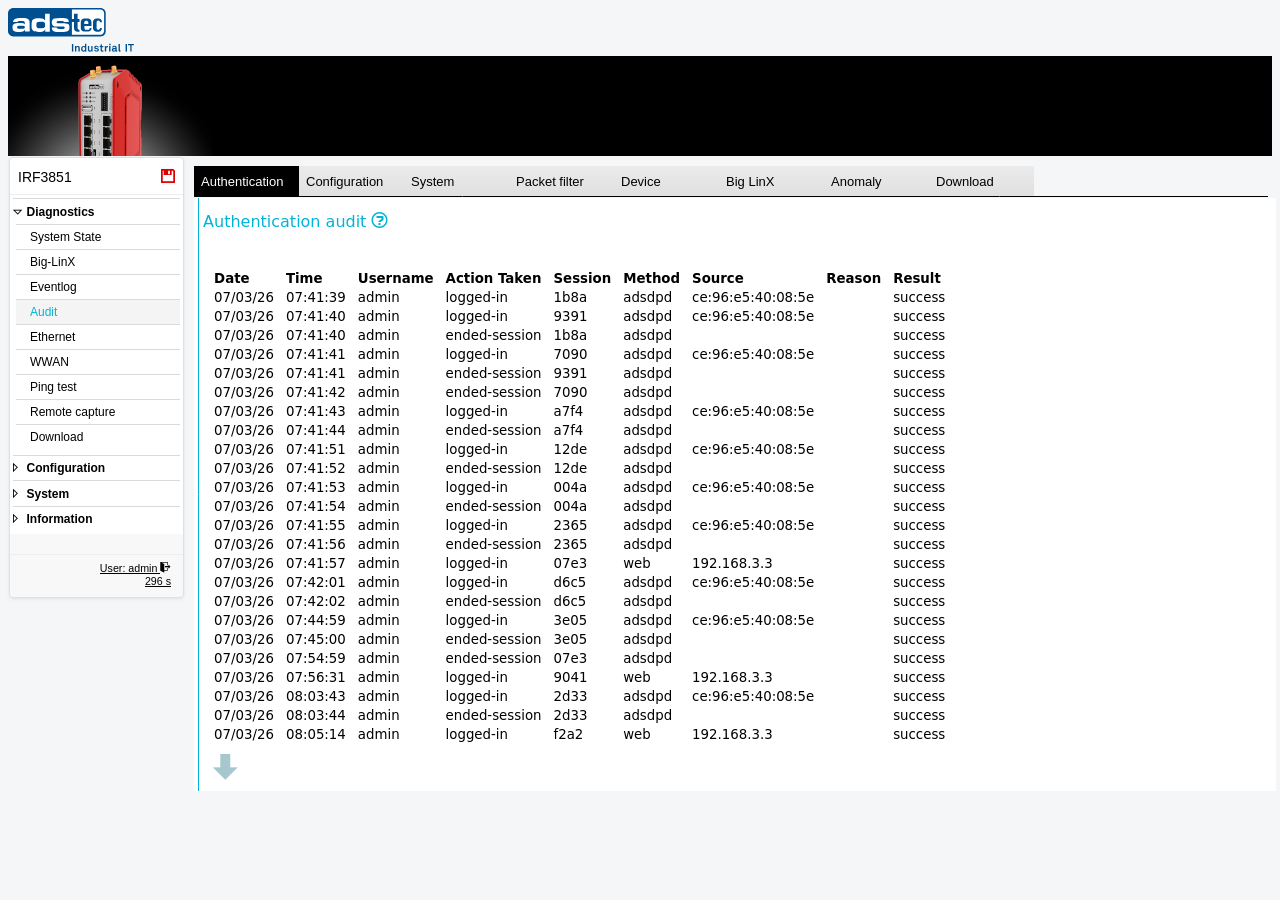
Tabs
The Audit page organizes events into separate tabs by category. Each tab displays a table of log entries specific to that event type. Select a tab to view the corresponding audit records.
Authentication: Displays all login and logout events. This is the primary tab for reviewing access attempts and identifying unauthorized login activity. Each entry includes the date, time, username, action taken (e.g., logged-in, logged-out), session identifier, access method, source IP address, failure reason (if applicable), and result (success or failed).
Configuration: Displays events related to configuration changes made through the web interface or API. Use this tab to trace which settings were modified, when, and by whom.
System: Displays system-level events such as reboots, firmware updates, and save operations.
Packet filter: Displays events generated by the packet filter rules, such as blocked or accepted connections that have been configured to generate log entries.
Device: Displays events related to device hardware and operational state changes.
Big LinX: Displays events related to Big-LinX cloud VPN connections, including connection establishment and disconnection events.
Anomaly: Displays events flagged as anomalous by the device's security monitoring, such as unusual traffic patterns or repeated failed access attempts.
Download: Allows you to download the audit log file for external archiving or analysis.
Authentication audit columns
The Authentication tab — shown in the screenshot above — contains the following columns:
- Date
- The date on which the authentication event occurred.
- Time
- The time at which the authentication event occurred.
- Username
- The user account name associated with the login attempt. This field may be empty for failed attempts where no valid username was provided.
- Action Taken
- The type of authentication action, such as logged-in or logged-out.
- Session
- A short session identifier assigned to the authentication session. This field may be empty for failed login attempts where no session was established.
- Method
- The access method used for the login attempt, such as web for web interface access.
- Source
- The IP address from which the login attempt originated. This field helps identify the network location of the user or potential attacker.
- Reason
- The reason for a failed login attempt, such as netsource-mismatch when the connection originates from a network that is not permitted for the user account. This field is empty for successful logins.
- Result
- The outcome of the authentication attempt — success or failed.
Security
Failed logins during an active login ban period are not logged. Configure a sufficiently large login ban timeout on the User accounts page to prevent flooding the audit log with repeated failed login attempts.
Note
The audit log is a shared 40 MB ring buffer. When the buffer is full, the oldest entries across all tabs are overwritten. For long-term retention, regularly download the audit log using the Download tab and archive it on an external system. Review the Eventlog page for general system event monitoring.