SNMP
Navigation: Configuration > Services > SNMP
The SNMP page configures the Simple Network Management Protocol (SNMP) service on the IRF1000. SNMP allows external network management systems to monitor device status, query operational parameters, and receive event notifications. The device exclusively uses SNMPv3, which provides authentication and encryption to protect management traffic against eavesdropping and tampering. This page controls the SNMPv3 user credentials, the authentication and encryption protocols, as well as SNMP trap delivery to up to three receivers. The SNMP Access table at the bottom of the page determines on which interfaces the SNMP service accepts incoming requests — use the Packet filter page to define more granular access restrictions if needed.
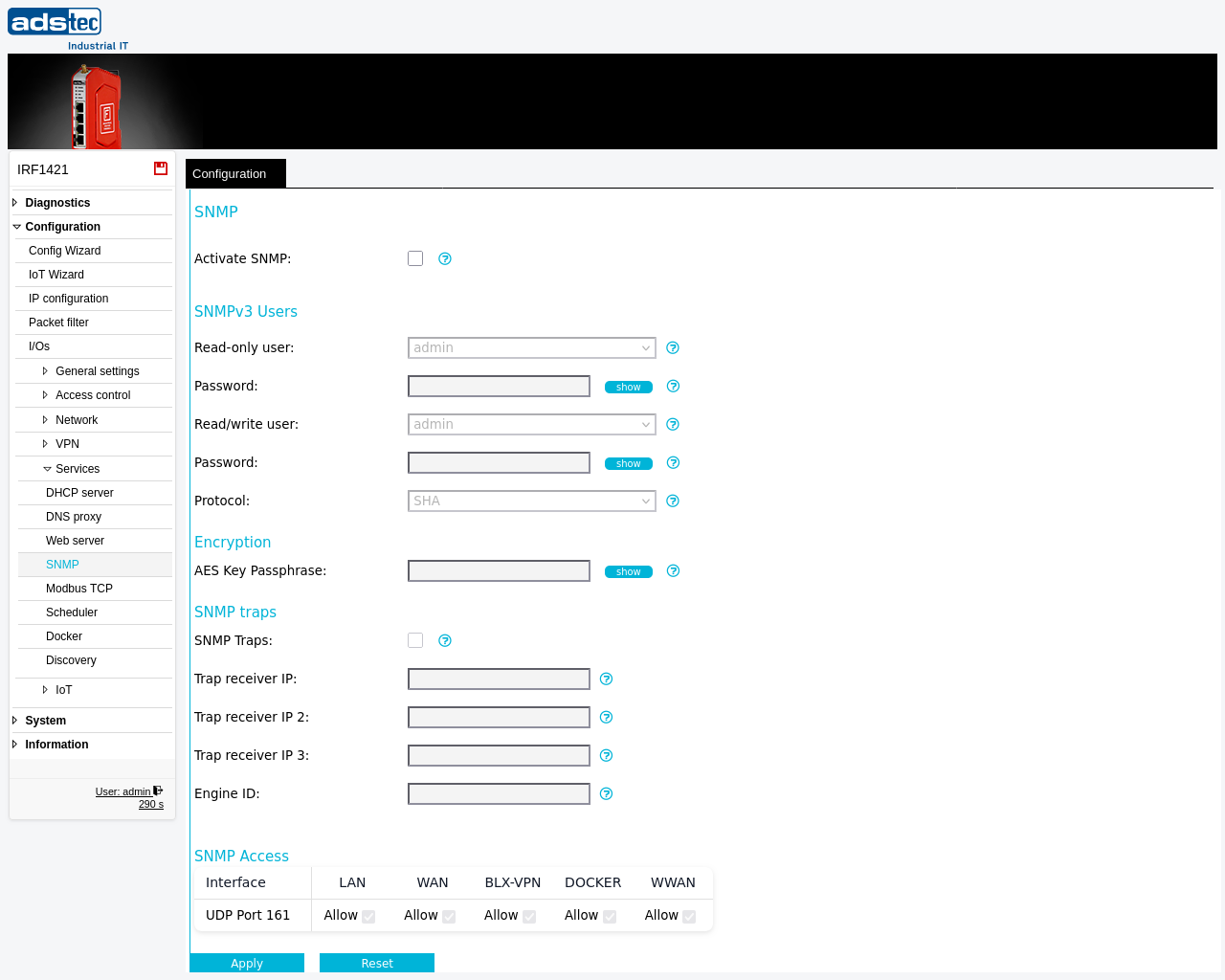
Settings
SNMP
- Activate SNMP
- Enables the SNMPv3 interface. When disabled, the device does not respond to any SNMP requests and does not generate SNMP traps.
SNMPv3 Users
- Read-only user
- Selects a user account from the available users which shall be used for the SNMP read service. This user can query device information via SNMP but cannot modify settings.
- Password
- Password for SNMPv3 read-only access. More than 8 alphanumerical characters are required. This password is a service password for the SNMP service and is independent of the management interface password. The management interface password policy does not apply. Use a secure password appropriate to your threat model and risk assessment.
- Read/write user
- Selects a user account from the available users which shall be used for the SNMP read/write service. This user can both query and modify device parameters via SNMP.
- Password
- Password for SNMPv3 read/write access. More than 8 alphanumerical characters are required. This password is a service password for the SNMP service and is independent of the management interface password. The management interface password policy does not apply. Use a secure password appropriate to your threat model and risk assessment.
- Protocol
- Authentication protocol for SNMPv3. It is recommended to use the newer SHA variants (SHA-224, SHA-256, SHA-384, SHA-512) instead of MD5 or SHA, which should only be used if legacy clients do not support the newer algorithms.
Encryption
- AES Key Passphrase
- SNMPv3 pre-shared key for encryption. The privacy protocol is AES. This passphrase protects the confidentiality of all SNMP communication between the device and the management station.
SNMP traps
- SNMP Traps
- Activates the SNMP trap generation subsystem. The read-only user is used for SNMP traps. Traps are sent as SNMPv3 traps with the configured encryption, engine ID, and authentication settings.
- Trap receiver IP
- Hostname or IP address of the primary server where SNMP traps are sent to.
- Trap receiver IP 2
- Optional hostname or IP address of the second SNMP trap receiver.
- Trap receiver IP 3
- Optional hostname or IP address of the third SNMP trap receiver.
- Engine ID
- The SNMP engine ID uniquely identifies the SNMP agent on this device. If left empty, the system generates a unique ID automatically. User-specified values must start with
0xand contain 5 to 64 hexadecimal digits.
ATTENTION
SNMP passwords are service-specific credentials that are independent of the web interface login. The password policy configured for management interface user accounts does not apply to SNMP passwords. Ensure that SNMP passwords meet your organization's security requirements. Changing the read-only user password also affects SNMP trap authentication, since traps use the read-only user credentials.
Security
Only enable the SNMP service if it is actively required for network monitoring. Restrict SNMP access to the minimum necessary interfaces using the SNMP Access table and the Packet filter. Use strong authentication passwords and AES encryption passphrases with sufficient length and complexity. Select SHA-256 or a stronger authentication protocol — avoid MD5 and SHA-1 unless required for compatibility with legacy management stations. Assign different user accounts for read-only and read/write access and use the read/write account only where configuration changes via SNMP are explicitly needed.