LAN
Navigation: Diagnostics > LAN
The LAN diagnostics page displays the current status and traffic statistics for each LAN port of the device. Use this page to verify physical link state, negotiated connection speed, and to monitor packet counters for troubleshooting network issues such as link failures, packet loss, or interface errors. The information shown here reflects the real-time state of the hardware interface and is updated each time the page is loaded or refreshed.
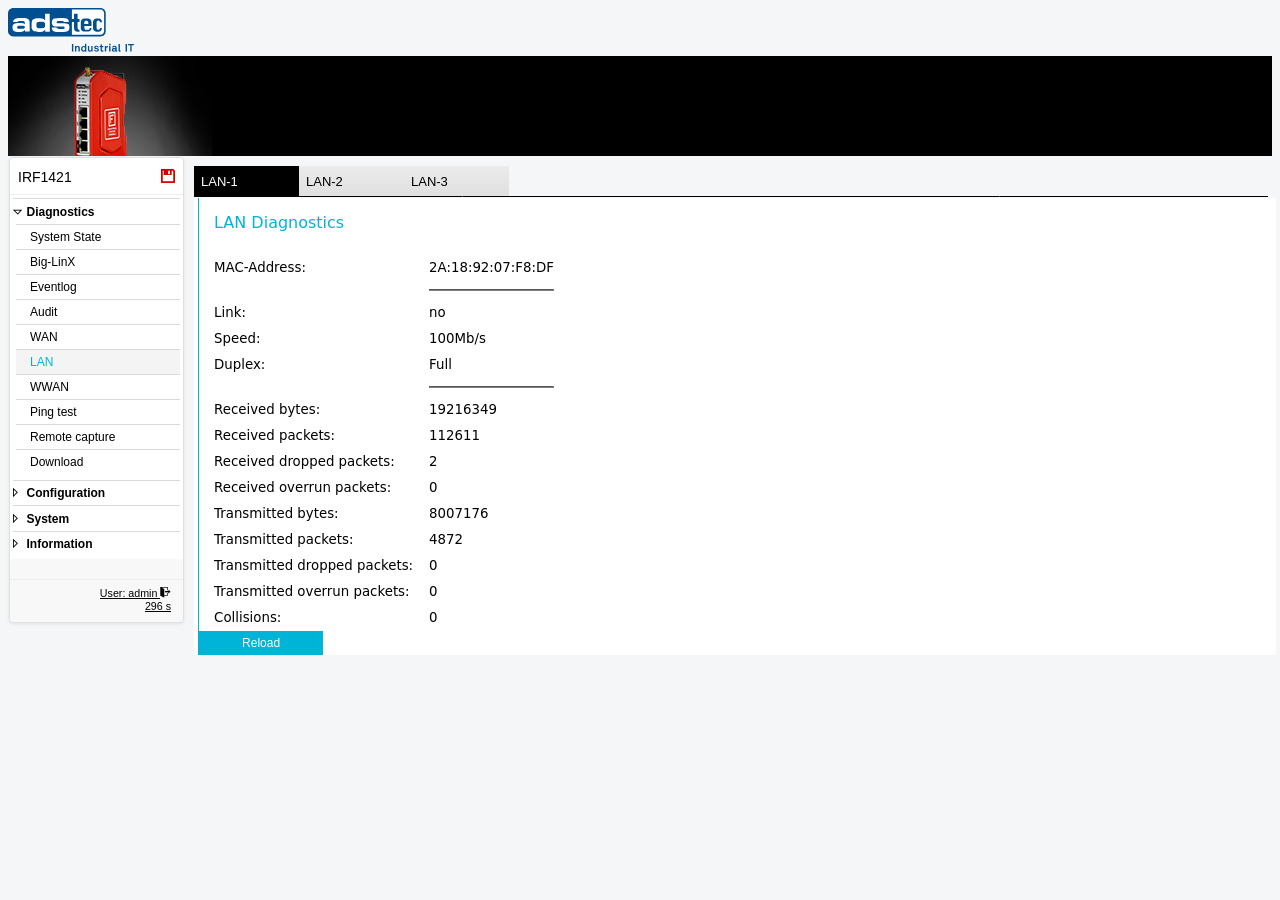
Port selection
The device provides multiple LAN ports, each shown as a separate tab at the top of the page (LAN-1, LAN-2, LAN-3). Select the appropriate tab to view diagnostics for the corresponding port.
Note
The number of available LAN ports depends on the hardware variant of the device. Not all tabs may correspond to physically present ports on every model.
Link information
The upper section displays the physical link parameters for the selected LAN port:
- MAC-Address
- The hardware MAC address assigned to the LAN interface.
- Link
- The current link state of the port — yes if a cable is connected and a link is established, no if no active link is detected.
- Speed
- The negotiated link speed (e.g., 10Mb/s, 100Mb/s, or 1000Mb/s). This value reflects the speed agreed upon during auto-negotiation with the connected device. The speed can be configured manually on the Ethernet page.
- Duplex
- The negotiated duplex mode — Full (simultaneous send and receive) or Half (alternating send and receive).
Traffic statistics
The lower section displays cumulative packet and byte counters for the selected LAN port since the last device reboot:
- Received bytes
- The total number of bytes received on this port.
- Received packets
- The total number of packets received on this port.
- Received dropped packets
- The number of received packets that were dropped by the system, for example due to buffer overflows or filtering rules. A non-zero value may indicate resource constraints or high traffic load.
- Received overrun packets
- The number of received packets lost because the interface buffer was full and could not process incoming data fast enough. Persistent overruns may indicate that the connected network segment is generating more traffic than the interface can handle.
- Transmitted bytes
- The total number of bytes transmitted from this port.
- Transmitted packets
- The total number of packets transmitted from this port.
- Transmitted dropped packets
- The number of outbound packets that were dropped before transmission. This can occur due to queue overflow or system resource limitations.
- Transmitted overrun packets
- The number of outbound packets lost due to transmit buffer overruns.
- Collisions
- The number of Ethernet collisions detected on this port. Collisions typically occur only on half-duplex links or in the presence of network wiring issues. On a properly configured full-duplex link, this counter should remain at zero.
Note
All traffic counters are reset to zero when the device is rebooted. The counters represent cumulative values since the last system start.
Click Reload to refresh the displayed values with the current statistics from the device.