Bonding
Navigation: Configuration > Network > Bonding
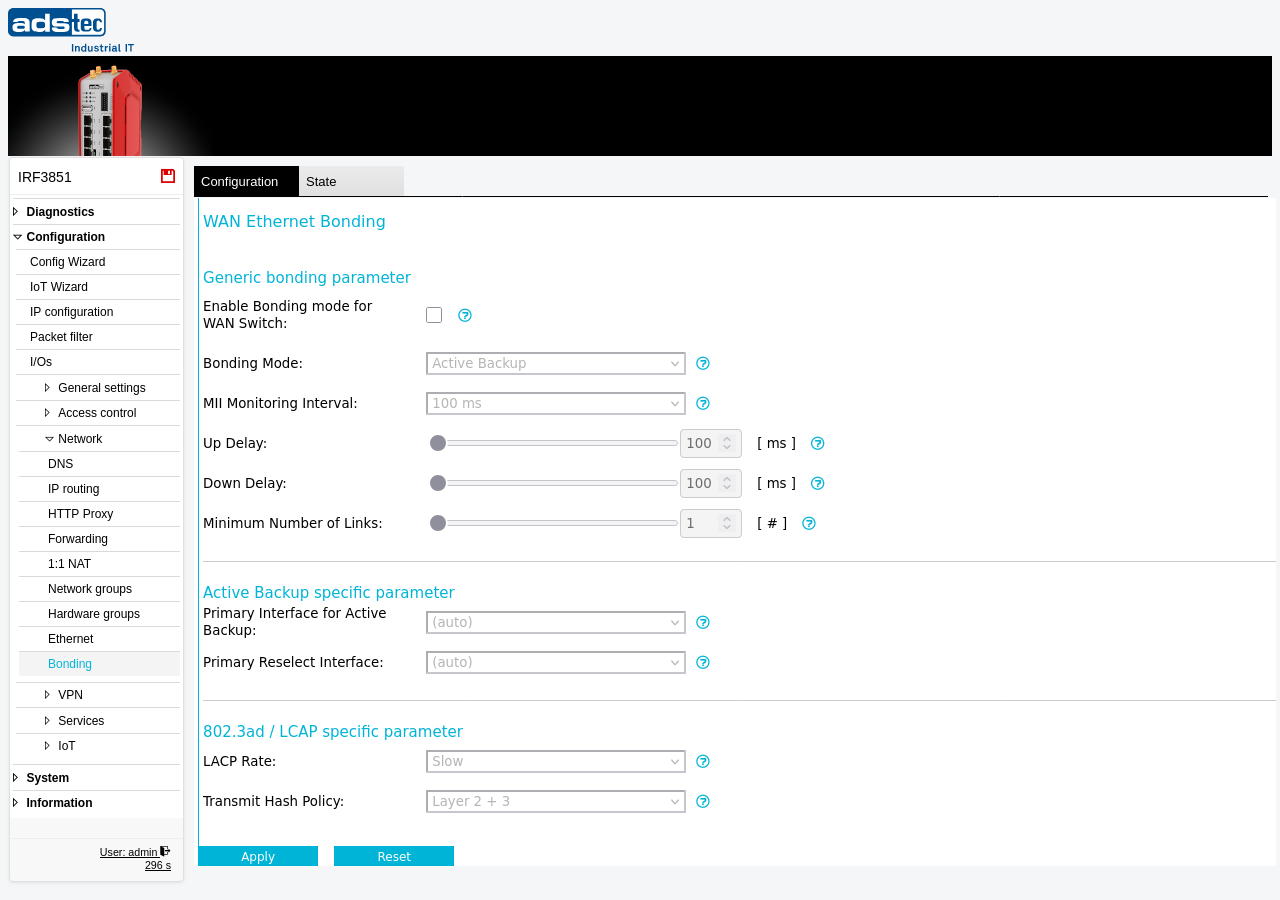
The Bonding page configures Ethernet link aggregation for the WAN ports of the IRF3000. When enabled, the individual WAN switch ports operate as bonded interfaces rather than bridged Ethernet ports, providing either fault tolerance through automatic failover or increased bandwidth through link aggregation. Bonding is only available when the device is operating in the IP-Router Extended mode, which can be set on the IP configuration page. Two bonding modes are supported: Active Backup for high-availability scenarios where one link takes over if another fails, and 802.3ad / LACP for aggregated bandwidth with standards-based link negotiation. The physical port settings for each Ethernet port are configured on the Ethernet page.
Prerequisites
- The operational mode must be set to IP-Router Extended on the IP configuration page. Bonding cannot be enabled in other operational modes.
- When using 802.3ad / LACP mode, the switch on the other end of the Ethernet link must support IEEE 802.3ad and be configured with matching settings.
Settings
General bonding parameters
- Enable Bonding mode for WAN
- Activates bonding for the WAN switch ports. When enabled, the WAN ports operate as bonded Ethernet interfaces instead of bridged Ethernet ports. This option is only available in the IP-Router Extended operational mode.
- Bonding Mode
-
Selects the bonding algorithm used for the WAN interfaces.
Active Backup: Ensures continuous network availability by keeping one interface active and switching to a backup interface if the primary fails. This mode is ideal for fault tolerance and does not require any special switch support on the remote side.
802.3ad / LACP: An IEEE standard for link aggregation that combines multiple interfaces for increased bandwidth and redundancy. This mode requires a switch with 802.3ad support on the other end of the Ethernet link and matching configuration on that switch.
- MII Monitoring Interval
- Determines how often the link status of the bonded interfaces is checked (in milliseconds). Shorter intervals provide faster failure detection but may cause false positives if the link status fluctuates briefly. Choose an interval that balances detection speed with stability for your environment.
- Up Delay
- Sets the time (in milliseconds) the system waits after a link becomes available before considering it operational. This delay helps prevent brief link fluctuations from causing unnecessary switchovers.
- Down Delay
- Sets the time (in milliseconds) the system waits after a link is detected as unavailable before marking it as down. This delay can help reduce unnecessary failover actions caused by temporary link issues.
- Minimum Number of Links
- Specifies the number of active links required for the bonding group to be considered operational. This ensures that a defined level of link redundancy is maintained at all times. The valid range is 1 to 8.
Active Backup specific parameters
These parameters are only applicable when the Bonding Mode is set to Active Backup.
- Primary Interface for Active Backup
- Selects the primary interface for the Active Backup mode. This interface is used as the main link whenever it is available. If set to (auto), the system automatically selects the primary interface based on the bonding configuration and link status.
- Primary Reselect Interface
- Controls the reselection behavior for the primary interface in the Active Backup configuration. This setting determines whether a specific interface takes precedence when switching back from a failover event. If set to (auto), the system handles reselection automatically based on the bonding configuration and link status.
802.3ad / LACP specific parameters
These parameters are only applicable when the Bonding Mode is set to 802.3ad / LACP.
- LACP Rate
-
Determines how frequently LACP packets are exchanged between the bonded interfaces and the remote switch.
Fast: Sends LACP packets every second, providing quicker link status detection and faster response to link changes.
Slow: Sends LACP packets every 30 seconds. This setting reduces protocol overhead but results in slower detection of link failures.
- Transmit Hash Policy
-
Determines how outgoing traffic is distributed across the bonded links.
Layer 2: Distributes traffic based on MAC addresses. Suitable for simple topologies where most traffic flows between a small number of MAC address pairs.
Layer 2 + 3: Uses both MAC addresses and IP addresses for traffic distribution. Provides better load balancing than Layer 2 alone in environments with diverse IP traffic.
Layer 3 + 4: Uses IP addresses and TCP/UDP port numbers, providing the highest distribution granularity. This is the best choice for environments with many concurrent connections to different destinations.
ATTENTION
Changing the bonding mode or disabling bonding on a live system will temporarily disrupt WAN connectivity. Plan configuration changes during a maintenance window. When using 802.3ad / LACP mode, ensure that the remote switch is configured with matching 802.3ad settings before enabling bonding on the IRF3000 — a mismatch will result in loss of connectivity.
Security
Bonding in Active Backup mode provides network resilience by maintaining connectivity if a single link is physically severed or disconnected. In security-sensitive installations, set the Minimum Number of Links to a value that reflects the required redundancy level so that the bonding group goes down rather than operating with insufficient link capacity. Monitor link status changes via the Eventlog to detect potential physical tampering with network cables.