I/Os
Navigation: Configuration > I/Os
The I/Os page configures the behavior of the digital input (DI) on the device. The digital input accepts a 24 VDC signal and can be used as a CUT (emergency disconnect) trigger. When a CUT signal is received, the device can automatically disable network interfaces to physically isolate the protected network segment. This page controls which interfaces are disabled on a CUT event, how the CUT condition is acknowledged, and the timeout for automatic recovery. The I/Os page also provides an Input map tab to view the logical assignment of the digital input, and a State tab to monitor the current signal state in real time. The CUT function integrates with the Packet filter — when interface disabling is turned off, the CUT input state can instead be used as a condition in packet filter rules for more flexible, software-defined response to external signals.
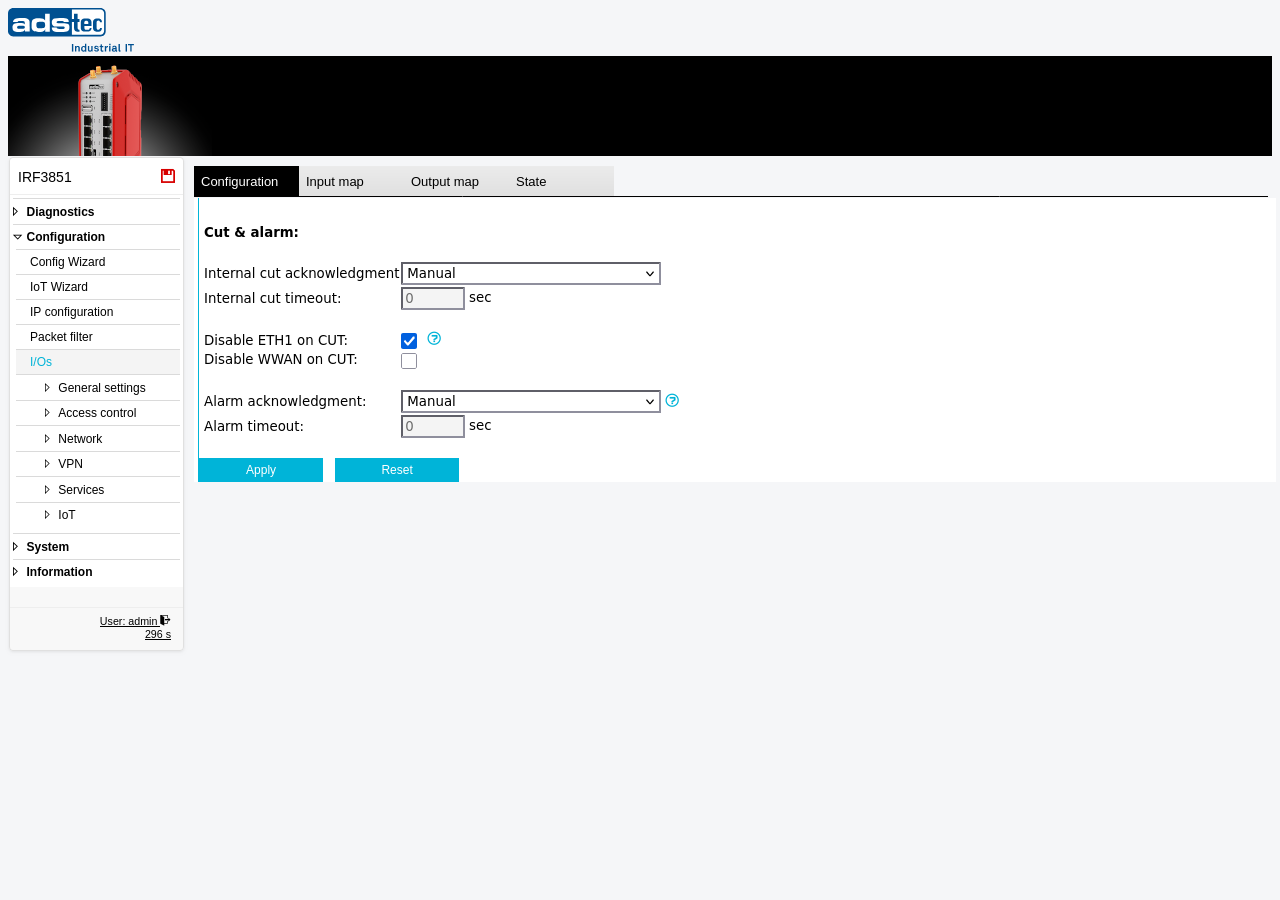
Settings
Cut & alarm
- Internal cut acknowledgment
-
Determines how the device recovers after a CUT signal is received and subsequently cleared.
Manual: The CUT condition must be acknowledged manually by an operator through the web interface before normal operation resumes. This is the safest option for environments where a deliberate human decision is required before reconnecting a network segment.
Automatic: The device automatically resumes normal operation as soon as the CUT signal is no longer present at the digital input.
Timeout: The device waits for the configured timeout period after the CUT signal is cleared before automatically resuming normal operation.
- Internal cut timeout
- The time in seconds that the device waits after the CUT signal is cleared before automatically restoring the disabled interfaces. This setting is only effective when Internal cut acknowledgment is set to Timeout. A value of 0 means the interfaces are restored immediately once the CUT signal is removed.
- Disable WAN on CUT
- When enabled, a CUT signal at the digital input disables the WAN Ethernet port, physically disconnecting the device from the upstream network. When this option is disabled, the CUT input can be used as a condition in Packet filter rules instead of disabling the interface entirely.
- Disable WWAN on CUT
- When enabled, a CUT signal at the digital input disables the WWAN (cellular) interface. This prevents all cellular communication when the CUT signal is active, ensuring complete network isolation including the wireless path.
ATTENTION
When Disable WAN on CUT is enabled, an active CUT signal physically disables the WAN Ethernet port. This interrupts all network traffic on the WAN interface, including remote management access to the device. Ensure that local access to the web interface via the LAN ports remains available for acknowledging the CUT condition and restoring normal operation.
Security
The CUT input provides a hardware-level emergency disconnect mechanism that operates independently of software-based firewall rules. In safety-critical installations, enable both Disable WAN on CUT and Disable WWAN on CUT to ensure complete network isolation when the external CUT signal is triggered. Set Internal cut acknowledgment to Manual to require deliberate operator intervention before network connectivity is restored. If the digital input is not used for CUT functionality, disable the interface options and use the CUT signal state in Packet filter rules for a more granular, software-defined security response.