State
Navigation: Configuration > I/Os > State
The State tab provides a real-time overview of the CUT and alarm signal states on the IRF1000. Use this tab to verify whether a CUT or alarm event is currently active, to check the configured acknowledgment mode, and to monitor the logical state of all digital inputs and outputs. This information is essential for troubleshooting CUT-related network isolation events and for confirming that the device has returned to normal operation. The corresponding CUT behavior and acknowledgment settings are configured on the I/Os parent page.
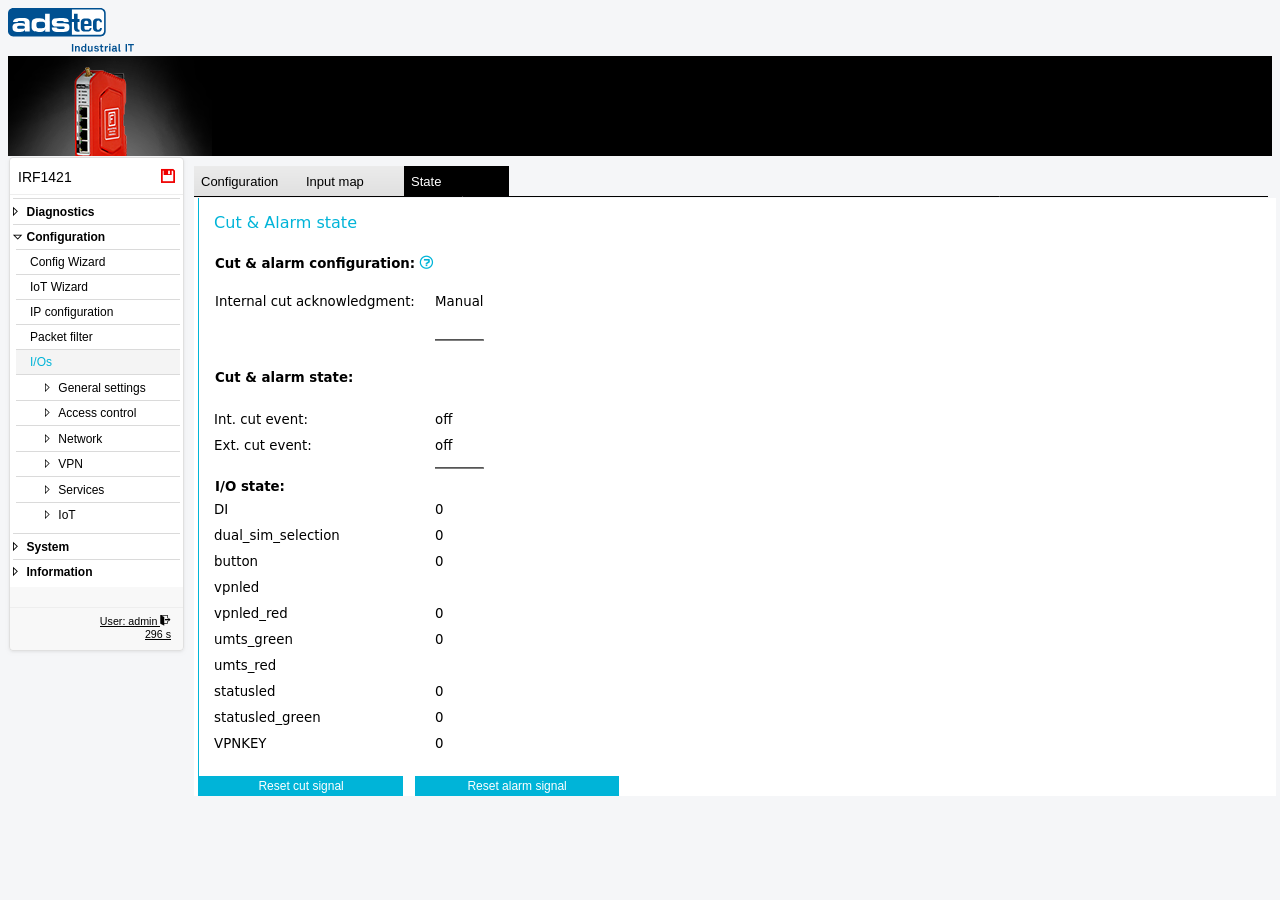
Cut & alarm configuration
This section displays the currently active acknowledgment mode as configured on the I/Os page.
- Internal cut acknowledgment
- Shows the configured acknowledgment mode for the internal CUT signal. Possible values are Manual, Automatic, or Timeout. This is a read-only reflection of the setting on the I/Os configuration tab.
Note
An alarm may either require manual acknowledgment (the alarm must be reset manually) or provide automatic acknowledgment (the alarm is reset after a timeout). The same applies to a CUT event.
Cut & alarm state
This section shows whether a CUT or alarm event is currently active.
- Int. cut event
- Indicates the current state of the internal CUT event. A value of off means no internal CUT condition is active. When a CUT event is triggered, this field changes to reflect the active state.
- Ext. cut event
- Indicates the current state of the external CUT event as received at the digital input. A value of off means no external CUT signal is present at the digital input.
I/O state
This section lists all digital inputs, outputs, and LED indicators on the device along with their current logical state. Each row shows the signal name and its current value. A value of 0 indicates an inactive (low) signal; a value of 1 indicates an active (high) signal. Entries without a displayed value are currently not reporting a state.
- DI
- The digital input (24 VDC). Reflects the electrical state of the CUT input terminal.
- dual_sim_selection
- Indicates the currently selected SIM card slot for the cellular modem.
- button
- Reflects the state of the physical button on the device.
- vpnled
- The VPN status LED output.
- vpnled_red
- The red component of the VPN status LED.
- umts_green
- The green component of the WWAN (cellular) status LED.
- umts_red
- The red component of the WWAN (cellular) status LED.
- statusled
- The general system status LED output.
- statusled_green
- The green component of the system status LED.
- VPNKEY
- The VPN key button input state.
Actions
- Reset cut signal
- Manually acknowledges and resets an active CUT condition. This button is used when Internal cut acknowledgment is set to Manual on the I/Os page and a CUT event has been triggered. Pressing this button restores the previously disabled network interfaces and returns the device to normal operation.
- Reset alarm signal
- Manually acknowledges and resets an active alarm condition. This button is used when the alarm requires manual acknowledgment.
ATTENTION
Before resetting a CUT signal, verify that the external condition that triggered the CUT event has been resolved. Resetting the CUT signal restores network connectivity on all previously disabled interfaces (WAN, WWAN), which may re-expose the protected network segment.