DNS proxy
Navigation: Configuration > Services > DNS proxy
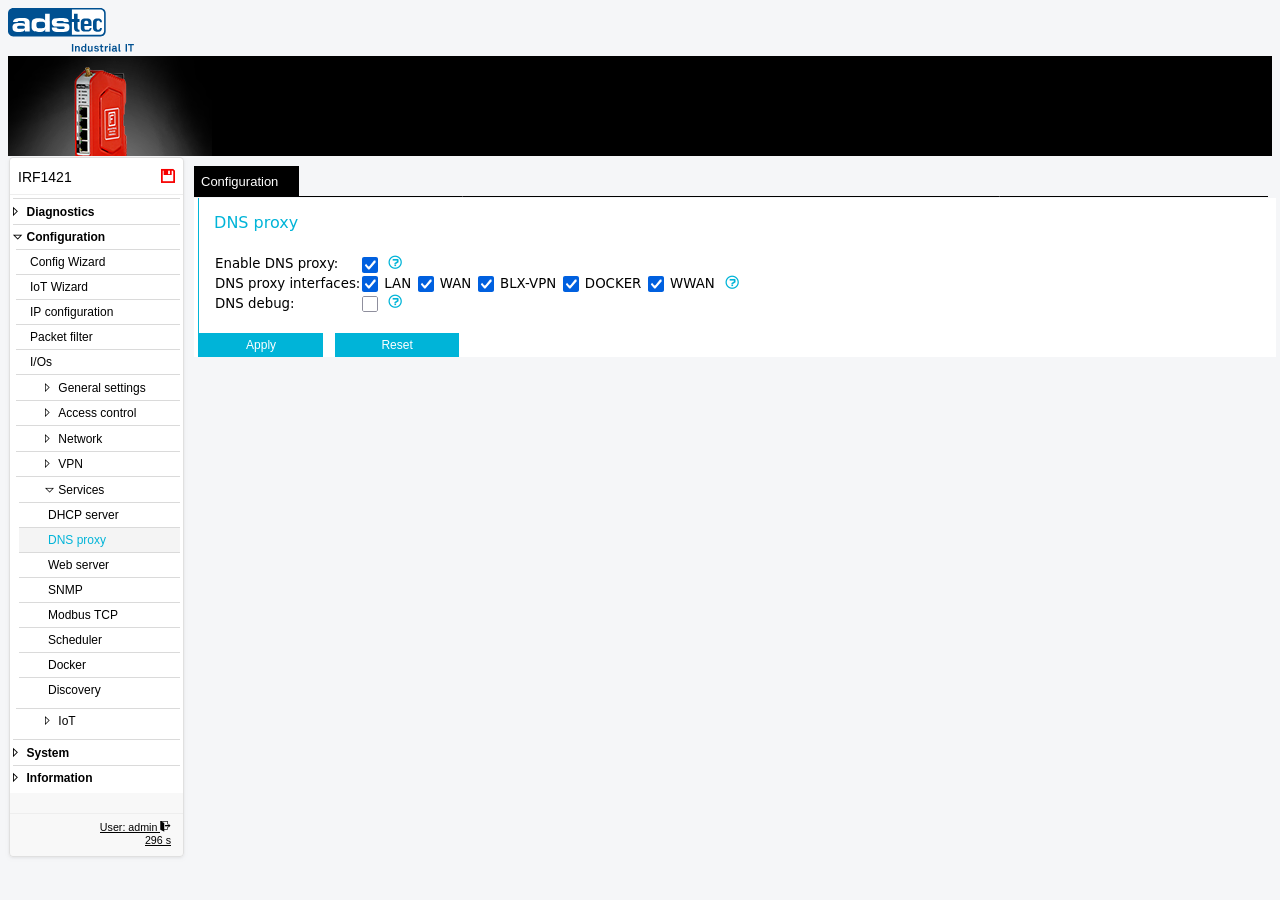
The DNS proxy page configures the device to operate as a local DNS server that forwards name resolution requests to the upstream DNS servers defined on the DNS page. When enabled, clients connected to the firewall can use the device's IP address as their DNS server, and the device resolves domain names on their behalf. This is particularly important when host names or domain names are used in Packet filter rules, as the packet filter can only resolve these names if the DNS proxy is active. The DNS proxy can be selectively enabled per interface, allowing precise control over which network segments have access to DNS resolution through the device. The upstream DNS servers used for forwarding are configured on the DNS page. If the DHCP server is active, DHCP clients automatically receive the device's IP address as their DNS server. Changes take effect immediately after clicking Apply settings, but must be saved persistently via the Save page to survive a reboot.
Prerequisites
- The upstream DNS servers must be configured on the DNS page before the DNS proxy can forward requests successfully.
- The device must be operating in IP router mode. Set the operational mode on the IP configuration page.
- If host names or domain names are used in Packet filter rules, the DNS proxy must be enabled for name resolution to function.
Settings
- Enable DNS proxy
- Activates the DNS proxy service. The device then acts as a DNS server and forwards DNS requests from connected clients to the upstream DNS servers configured on the DNS page. This feature must be enabled if host names or domain names are used in the Packet filter.
- DNS proxy interfaces
-
Selects the interfaces on which the DNS proxy accepts DNS requests. Each interface can be enabled independently using its checkbox. Disabling an interface blocks all DNS traffic on that interface -- not only for other devices connected to that interface, but also for the device itself when communicating via that interface. Ensure that the interface connecting to your upstream DNS server remains enabled, otherwise domain name resolution will fail entirely.
LAN: Accepts DNS requests from devices on the local network. This is the most common setting for industrial environments where LAN clients require name resolution through the firewall.
WAN: Accepts DNS requests on the wide area network interface. Enable this only if the device needs to resolve DNS queries for WAN-side clients or if the upstream DNS server is reachable via WAN.
BLX-VPN: Accepts DNS requests from devices connected through a Big-LinX VPN tunnel. Enable this if remote clients connected via Big-LinX require DNS resolution through this device.
DOCKER: Accepts DNS requests from Docker containers running on the device. Enable this if containers managed via the Docker service require name resolution through the firewall's DNS proxy.
WWAN: Accepts DNS requests on the wireless WAN interface. Enable this if mobile network clients require DNS resolution through the device.
- DNS debug
- Enables logging of all DNS queries to the Eventlog. Use this setting for troubleshooting DNS resolution issues. Disable it during normal operation to reduce log volume.
ATTENTION
Disabling the DNS proxy on an interface blocks all DNS traffic on that interface for both connected clients and the device itself. If the interface to the upstream DNS server is disabled, the device loses the ability to resolve domain names entirely. This also affects packet filter rules that reference host or domain names, VPN connections that rely on DNS-based endpoints, and other services that depend on name resolution. Verify that all required interfaces remain enabled after making changes.
Security
Enable the DNS proxy only on interfaces where DNS resolution is required. Running the DNS proxy on external-facing interfaces such as WAN or WWAN exposes the DNS service to the external network, which can be exploited for DNS amplification attacks or information disclosure. In security-sensitive environments, restrict the DNS proxy to the LAN interface and any VPN interfaces that require name resolution. If DNS debugging is enabled for troubleshooting, disable it after diagnosis is complete to prevent continuous logging of all DNS queries, which may contain sensitive information about network communication patterns.