DHCP server
Navigation: Configuration > Services > DHCP server
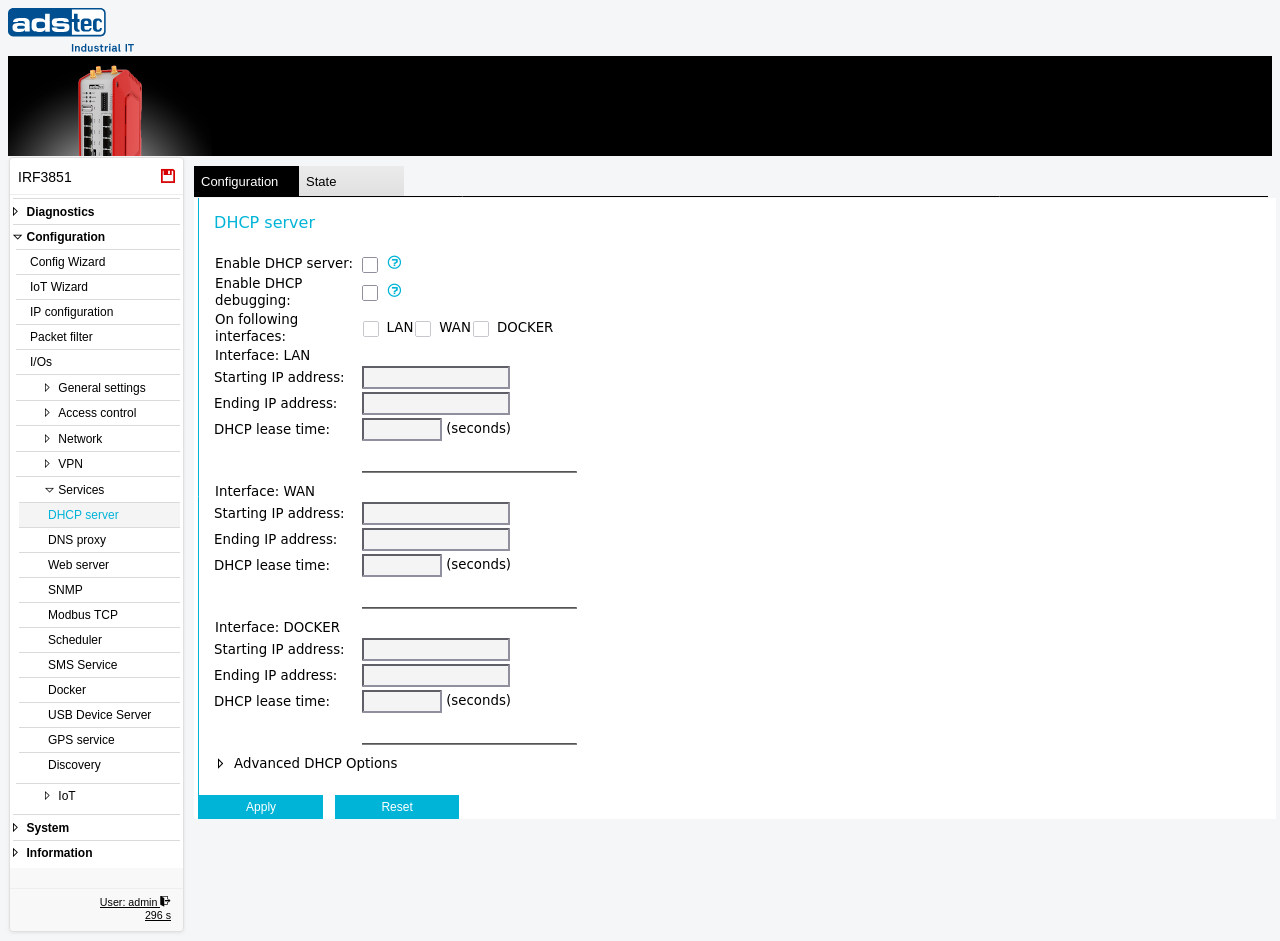
The DHCP server page configures the device to automatically assign IP addresses to clients connected on the LAN, WAN, or Docker interfaces. When enabled, the device responds to DHCP requests from network clients and provides them with an IP address from a defined address range, along with DNS server information. This eliminates the need for manual IP configuration on each client device. The DHCP server is commonly used on the LAN interface to supply addresses to machines and devices in the local industrial network. The IP address ranges configured here must fall within the same subnet as the IP address of the respective interface, as defined on the IP configuration page. Changes take effect immediately after clicking Apply settings, but must be saved persistently via the Save page to survive a reboot.
Prerequisites
- The device must be operating in IP router mode. The DHCP server is not available in transparent bridge mode. Set the operational mode on the IP configuration page.
- The IP address and subnet mask of each interface that should serve DHCP must be configured on the IP configuration page before defining the address range here.
- If a DNS proxy is needed for DHCP clients, configure it on the DNS proxy page.
Settings
General
- Enable DHCP server
- Enables the DHCP service. When activated, the device answers DHCP requests on the selected interfaces with the configured IP address range and name server settings.
- Enable DHCP debugging
- Enables detailed logging of all DHCP requests and responses in the event log. Use this setting for troubleshooting DHCP address assignment issues. Disable it during normal operation to reduce log volume.
- On following interfaces
-
Selects the interfaces on which the DHCP server listens for requests. Each interface can be enabled independently using its checkbox.
LAN: Serves DHCP on the local network interface. This is the most common configuration for providing IP addresses to devices on the protected side of the firewall.
WAN: Serves DHCP on the wide area network interface. Use this only if the device is intended to assign addresses to clients on the WAN side.
DOCKER: Serves DHCP on the Docker bridge interface. Use this when Docker containers require dynamic IP address assignment from the device rather than from Docker's own internal DHCP.
Interface: LAN
- Starting IP address
- The first IP address in the range that the DHCP server assigns to LAN clients. This address must be within the same subnet as the LAN interface IP address configured on the IP configuration page.
- Ending IP address
- The last IP address in the range that the DHCP server assigns to LAN clients. Together with the starting IP address, this defines the pool of available addresses.
- DHCP lease time
- The duration in seconds for which an assigned IP address remains valid. After the lease expires, the client must request a renewal. Typical values range from 3600 (1 hour) for environments with frequently changing devices to 86400 (24 hours) or longer for stable installations.
Interface: WAN
- Starting IP address
- The first IP address in the range assigned to WAN clients. This address must be within the same subnet as the WAN interface IP address.
- Ending IP address
- The last IP address in the range assigned to WAN clients.
- DHCP lease time
- The duration in seconds for which an assigned IP address on the WAN interface remains valid.
Interface: DOCKER
- Starting IP address
- The first IP address in the range assigned to Docker clients. This address must be within the same subnet as the Docker interface IP address.
- Ending IP address
- The last IP address in the range assigned to Docker clients.
- DHCP lease time
- The duration in seconds for which an assigned IP address on the Docker interface remains valid.
ATTENTION
The IP address range for each interface must lie within the same subnet as the IP address of the interface itself. If the range does not match the interface subnet, DHCP clients will receive addresses that cannot communicate with the gateway. Verify the interface subnet on the IP configuration page before configuring the address pool.
Security
Enable the DHCP server only on interfaces where automatic address assignment is required. Running a DHCP server on the WAN interface exposes the service to the external network and may allow unauthorized devices to obtain network configuration. In security-sensitive environments, prefer static IP assignment and disable the DHCP server entirely to reduce the attack surface. If DHCP debugging is enabled for troubleshooting, disable it after diagnosis is complete to prevent excessive logging of network activity.