Big-LinX
Navigation: Configuration > VPN > Big-LinX
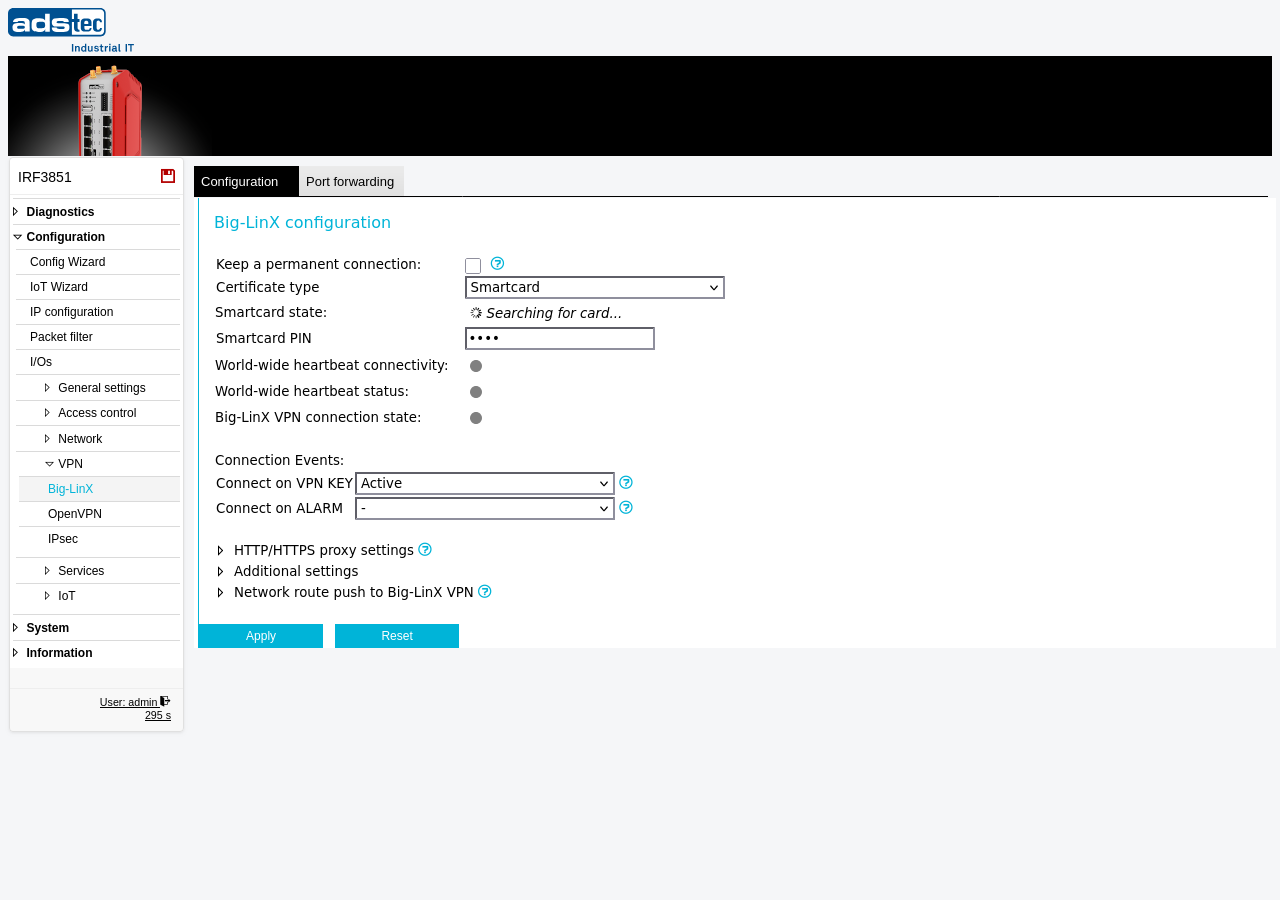
This page configures the Big-LinX cloud VPN connection. Big-LinX is a managed remote access platform that establishes encrypted VPN tunnels between the device and the Big-LinX cloud infrastructure, enabling secure remote maintenance of industrial equipment. The device authenticates with the Big-LinX server using a smartcard certificate or a software certificate stored on the device. Once configured, VPN connections can be established permanently, manually from the Big-LinX diagnostics page, or triggered automatically by connection events such as the VPN KEY switch or ALARM input. The page also provides settings for HTTP/HTTPS proxy tunneling, VPN approval workflows, route pushing, and connection optimization. Current connection status can be monitored on the Big-LinX diagnostics page.
Prerequisites
- A valid Big-LinX certificate must be provisioned for this device. For smartcard-based authentication, the smartcard must be inserted and its PIN must be known. For software certificates, the certificate must be uploaded via the Certificates page.
- The device must have internet connectivity on the WAN interface to reach the Big-LinX heartbeat and VPN servers.
- If the network requires outbound traffic to pass through a proxy, configure the system-wide proxy on the HTTP Proxy page before enabling Big-LinX proxy tunneling.
Settings
Big-LinX configuration
- Keep a permanent connection
- When enabled, the device maintains a permanent VPN connection to the Big-LinX cloud. Manual connects, connection tests, and connection events are disabled in this mode.
- Certificate type
- Selects the type of certificate used for Big-LinX authentication. When set to Smartcard, the device uses a hardware smartcard for authentication. The smartcard state and PIN fields below apply only to this mode.
- Smartcard state
- Displays the current status of the inserted smartcard.
- Smartcard PIN
- The PIN for the inserted smartcard. The PIN must be stored on the device to enable event-triggered VPN connections.
- World-wide heartbeat connectivity
- Status indicator showing whether the device can reach the Big-LinX heartbeat servers. A green indicator confirms successful communication; a grey or red indicator signals a connectivity problem.
- World-wide heartbeat status
- Status indicator showing the result of the heartbeat exchange with the Big-LinX platform.
- Big-LinX VPN connection state
- Status indicator showing whether a Big-LinX VPN tunnel is currently established.
Connection Events
- Connect on VPN KEY
-
Triggers the VPN connection based on VPN KEY input events.
-: No action is taken on VPN KEY events.
Active: The VPN connection is established when the VPN KEY goes on.
Inactive: The VPN connection is established when the VPN KEY goes off.
When the VPN KEY event is acknowledged, the VPN connection closes. The acknowledge behavior is configured on the Cut & Alarm page. The smartcard PIN must be saved on the device to use this feature.
- Connect on ALARM
-
Triggers the VPN connection based on ALARM input events.
-: No action is taken on ALARM events.
Active: The VPN connection is established when the ALARM goes on.
Inactive: The VPN connection is established when the ALARM goes off.
When the ALARM event is acknowledged, the VPN connection closes. The acknowledge behavior is configured on the Cut & Alarm page. The smartcard PIN must be saved on the device to use this feature.
HTTP/HTTPS proxy settings
The Big-LinX VPN client can tunnel the VPN connection through an HTTP proxy. To the proxy, the traffic appears as standard HTTPS web traffic. If the proxy requires authentication, enter the username and password in the fields provided. The system-wide HTTP proxy must be configured on the HTTP Proxy page.
Additional settings
- SNAT for destination
- Enables source NAT (masquerading) for traffic to a specific server or subnet on the Big-LinX network. Use this when a remote server — for example, a condition monitoring system behind a Big-LinX infrastructure router — needs to reach the local networks. Specify the destination in CIDR notation (e.g., 172.16.1.100/32 for a single server, or 172.16.1.0/24 for an entire subnet).
- Log level
-
Controls the verbosity of Big-LinX VPN messages in the Eventlog.
none: No messages are logged.
info: Only basic information and critical errors are logged.
debug: State information for troubleshooting is also logged.
verbose: All possible messages are logged.
- VPN LED/output controller
-
Selects which VPN interface controls the VPN LED and the digital output function VPNUP. The LED indicates the connection state:
off: Connection disabled.
blinking: Connection is being established.
on: Connected.
- Inactivity timeout
- Closes a switched (event-triggered) VPN connection if less than 100 kB of data has been transferred within the specified time period. This prevents idle VPN connections from remaining open indefinitely.
- VPN approval mode
-
Requires a second approval before a Big-LinX VPN connection is established, adding an additional layer of access control.
disabled: VPN connections are established immediately upon request (default).
by API: The variable vpn_approve_now must be set to 1 by an external program before the VPN channel is established. This allows integration with external authorization systems.
by Switch: The VPN KEY switch must be physically active to allow the VPN to go online. This provides a hardware-based approval mechanism.
- Optimize connection for slow links
- Optimizes the VPN connection parameters for links with high latency (round trip times above 1000 ms), such as satellite connections.
- Enable WWHv3
- Enables the latest version of the WWH protocol. Ensure that the server wwh2-we.aw-cp.de (52.236.154.224) is reachable from the device before enabling this option.
Network route push to Big-LinX VPN
Select which local networks are pushed as routes through the Big-LinX VPN tunnel. Uncheck a network to exclude it from the VPN route push. Only interfaces with a static IP assignment are actually pushed. Interfaces using DHCP or monitor mode have no fixed network and are not pushed, even if checked. The checkboxes are displayed for all interfaces regardless of their current IP assignment.
ATTENTION
The smartcard PIN must be saved on the device for event-triggered VPN connections (VPN KEY, ALARM) to function. If the PIN is not stored, the device cannot authenticate with the Big-LinX server when a connection event occurs.
Security
Use the VPN approval mode to implement a two-person or two-factor authorization workflow for remote access connections. In security-critical environments, set the approval mode to by Switch so that a physical action at the device is required before any remote VPN session can be established. When the permanent connection mode is not required, prefer event-triggered connections to minimize the time window during which the VPN tunnel is open. Review the network route push settings to ensure that only the necessary local networks are accessible through the Big-LinX VPN tunnel, and disable routes for networks that do not require remote access.