Time Jumps
Introduction
A CUSTOM_TIME_JUMP event reports that the system time of the IRF1000 or IRF3000 has changed abruptly.
These events make it possible to detect manual clock manipulation, incorrect NTP synchronisation, or malfunction of the time management services.
For OT and industrial automation environments, stable and trusted timestamps are critical, because they influence log correlation, incident reconstruction, certificate validation and scheduled tasks.
If your SIEM or SOC sees unexpected or frequent time jump events, you should investigate for configuration errors, failing NTP servers or potential attempts to hide activities by changing the device time.
The device limits the creation of CUSTOM_TIME_JUMP audit entries to 4 messages per service per hour to avoid uncontrolled growth of the audit log file, so extremely noisy time changes may not be fully visible in the log.
Webinterface View
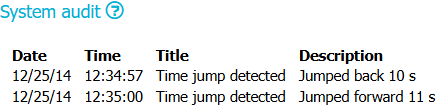
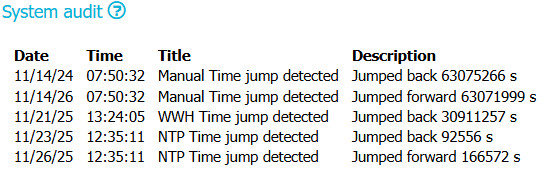
In the VIEW web interface, CUSTOM_TIME_JUMP audit entries appear in the System audit section.
The events are shown as simple rows in a table. The screenshot example shows entries such as:
Title:Time jump detected,Manual Time jump detected,WWH Time jump detected,NTP Time jump detectedDescription:Jumped back 10 s,Jumped forward 11 s, or larger values likeJumped back 63075266 s
The web interface does not show all raw audit.log fields. It presents only the most important information for operators.
Fields in the System audit table
| Web field | Description | Example value |
|---|---|---|
| Date | Local calendar date when the time jump was logged. | 11/23/25 |
| Time | Local time of the event, derived from the audit timestamp at log time. | 12:35:11 |
| Title | Short text from the title field in the audit message. It identifies the source of the time jump (manual, WWH, NTP). |
NTP Time jump detected |
| Description | Detailed text from the description field in the audit message. It states the direction of the change and how many seconds the clock moved. |
Jumped back 92556 s |
Mapping between web view and raw audit data:
- Title in the table is the value of
title="..."inside themsgpayload of the audit record. - Description in the table is the value of
description="..."inside themsgpayload. - Date and Time are derived from the numeric audit timestamp that appears after
audit(in the raw log line.
The web view does not display fields such as pid, uid, exe or res. To analyse those, you must use the raw audit.log file or your SIEM, which can parse the full message.
Explanation of the raw audit.log entry
The raw audit.log records for time jumps use the custom type CUSTOM_TIME_JUMP.
Each record is written by auditd when one of the time‑management services reports a detected jump.
Example structure
A typical entry looks like this (line breaks added only for readability):
type=CUSTOM_TIME_JUMP msg=audit(1763897711.524:66): pid=17180 uid=323 auid=4294967295 \
  ses=4294967295 msg='title="NTP Time jump detected" description="Jumped back 92556 s" \
  exe="/usr/sbin/chronyd" hostname=? addr=? terminal=? res=success'UID="chrony" AUID="unset"
Relevant fields for CUSTOM_TIME_JUMP
| Field name | Description | Example value |
|---|---|---|
type |
Audit record type. For these events it is always CUSTOM_TIME_JUMP. |
CUSTOM_TIME_JUMP |
msg (header) |
Standard audit header containing the event timestamp and a sequence id. | audit(1763897711.524:66) |
pid |
Process ID of the service that reported the time jump. | 17180 |
uid |
Effective Unix user ID of that process. | 323 |
auid |
Audit user ID set by auditd. For system daemons it is usually the unset value. | 4294967295 |
ses |
Audit session ID. Usually unset for system daemons. | 4294967295 |
msg (payload) |
Free‑form text payload with key–value pairs like title=, description=, exe=, hostname=, etc. |
msg='title="..." description="..." ...' |
title |
Summary of the event. Indicates whether the jump was manual, WWH or NTP‑based. | NTP Time jump detected |
description |
Detailed description with direction and magnitude of the jump in seconds. | Jumped back 92556 s |
exe |
Absolute path of the executable that detected and reported the time jump. | /usr/sbin/chronyd |
hostname |
Hostname field from auditd for this event. On the appliance it is not filled and appears as ?. |
? |
addr |
Remote address associated with the event. Not used for time jumps and appears as ?. |
? |
terminal |
Terminal identifier. For daemon‑generated events this is not set and appears as ?. |
? |
res |
Result flag from auditd. For these events it is always set to success, because the detection itself succeeded. |
success |
UID |
Text representation of uid as a name, provided by auditd. |
chrony |
AUID |
Text representation of auid. For system daemons this is typically unset. |
unset |
For SIEM or SOC integration, you usually parse on type=CUSTOM_TIME_JUMP, then extract title, description, exe, and the numeric timestamp from the header msg=audit(...).
Use the magnitude and direction of the jump to create alerts for suspicious manual changes or abnormal NTP or WWH corrections.
When the event is generated
A CUSTOM_TIME_JUMP event is generated whenever the system detects that the current system time has jumped forward or backward by a defined threshold.
The following services can generate this event by calling audit_log_user_message() from libaudit:
systemdfor all manual time changeschronyd(NTP client)wwhd(WWH service)wwhngd(WWH next‑generation service)
Generation rules:
- Manual time changes via
systemdare always logged, independent of the time difference. chronydlogs aCUSTOM_TIME_JUMPwhen NTP synchronisation changes the time by 10 seconds or more.wwhdandwwhngdlog aCUSTOM_TIME_JUMPwhen WWH time adjustment changes the time by 60 seconds or more.- Both forward and backward corrections are logged, with the direction and number of seconds shown in the
descriptionfield. - Each involved service is limited to 4
CUSTOM_TIME_JUMPevents per hour to protect the size ofaudit.log.
Use in security monitoring:
- Investigate any manual time jump on productive systems.
- Correlate time jump events with configuration changes, software updates or security incidents.
- Check for unstable NTP or WWH time sources when many automatic time jumps appear.
Sample audit.log entry
(1) type=CUSTOM_TIME_JUMP msg=audit(1731567032.156:14): pid=6122 uid=0 auid=4294967295 ses=4294967295 msg='title="Manual Time jump detected" description="Jumped back 63075266 s" exe="/usr/sbin/systemd" hostname=? addr=? terminal=? res=success'UID="root" AUID="unset"
(2) type=CUSTOM_TIME_JUMP msg=audit(1794639032.140:16): pid=6122 uid=0 auid=4294967295 ses=4294967295 msg='title="Manual Time jump detected" description="Jumped forward 63071999 s" exe="/usr/sbin/systemd" hostname=? addr=? terminal=? res=success'UID="root" AUID="unset"
(3) type=CUSTOM_TIME_JUMP msg=audit(1763727845.000:18): pid=8340 uid=0 auid=4294967295 ses=4294967295 msg='title="WWH Time jump detected" description="Jumped back 30911257 s" exe="/usr/sbin/wwhd" hostname=? addr=? terminal=? res=success'UID="root" AUID="unset"
(4) type=CUSTOM_TIME_JUMP msg=audit(1763897711.524:66): pid=17180 uid=323 auid=4294967295 ses=4294967295 msg='title="NTP Time jump detected" description="Jumped back 92556 s" exe="/usr/sbin/chronyd" hostname=? addr=? terminal=? res=success'UID="chrony" AUID="unset"
(5) type=CUSTOM_TIME_JUMP msg=audit(1764156911.372:67): pid=22722 uid=323 auid=4294967295 ses=4294967295 msg='title="NTP Time jump detected" description="Jumped forward 166572 s" exe="/usr/sbin/chronyd" hostname=? addr=? terminal=? res=success'UID="chrony" AUID="unset"