Forwarding
Navigation: Configuration > Network > Forwarding
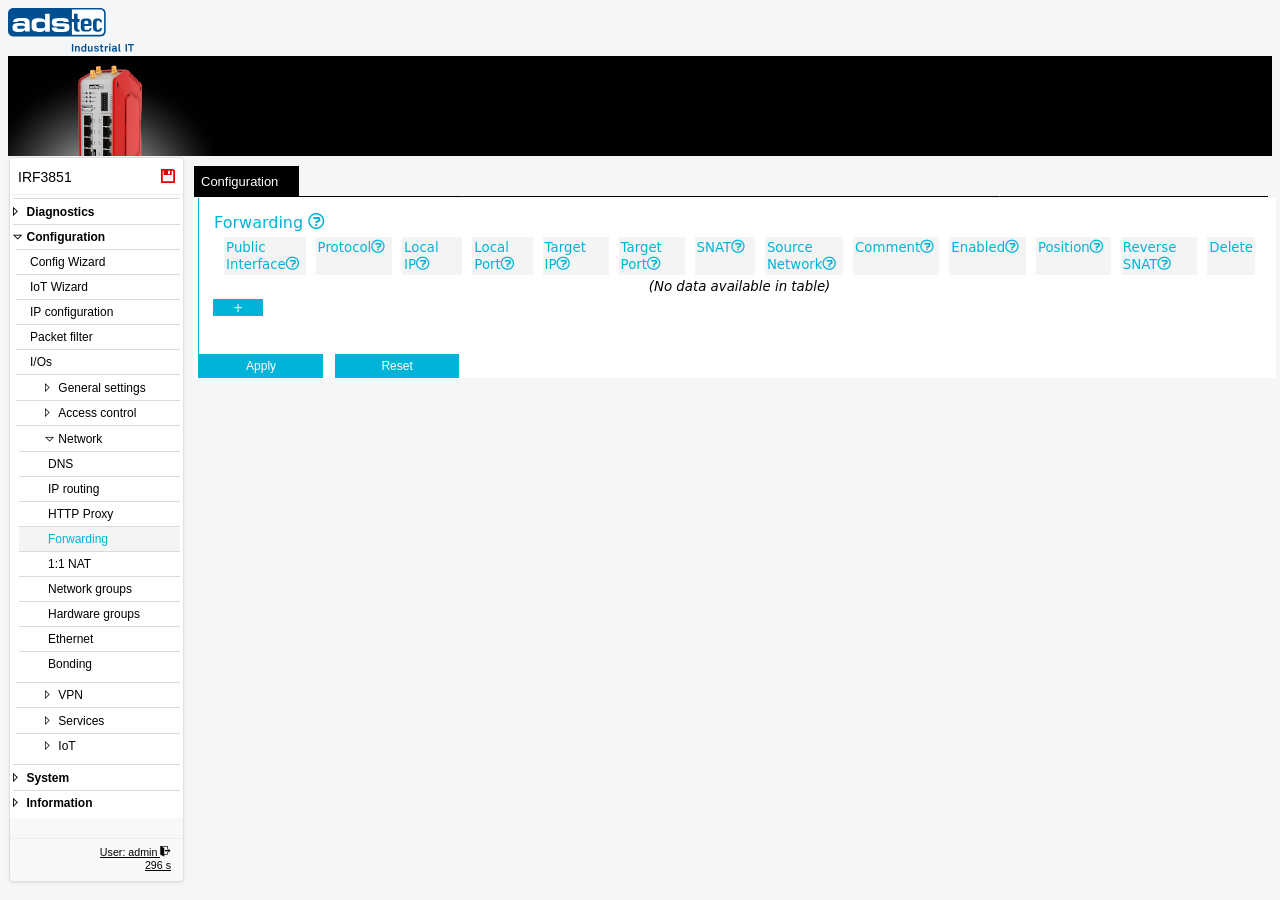
The Forwarding page configures port forwarding (destination NAT) rules that redirect incoming connections from an external network interface to devices on the internal network. This can be used to make services running on LAN-side devices — such as PLCs, HMIs, or web servers — accessible from the WAN, WWAN, or VPN interfaces. Forwarding can operate on specific TCP or UDP ports, port ranges, or on entire IP addresses using the wildcard protocol. The forwarding table is evaluated from top to bottom for each incoming packet until a matching rule is found, making rule order significant. Forwarding rules operate at the NAT level before the Packet filter, so corresponding packet filter rules must also be configured to allow the forwarded traffic to pass. For full address translation of entire subnets rather than individual port mappings, see 1:1 NAT.
Prerequisites
- The device must be operating in IP router mode. Port forwarding is only available on routed interfaces and has no effect in transparent bridge mode. Configure the operational mode on the IP configuration page.
- If a restrictive Packet filter is configured, the corresponding data paths must be opened there as well. The packet filter sees the forwarding target as the destination address and always the original source address, regardless of the SNAT setting.
- The target device must be reachable from the device on the internal network. Verify that IP addresses and routing are correctly configured on the IP configuration page.
Settings
Forwarding
The forwarding table displays all configured forwarding rules. Each rule defines how incoming traffic on a public interface is redirected to an internal target. Rules are evaluated from top to bottom — the first matching rule is applied and no further rules are checked for that packet.
- Public Interface
- The network interface on which the incoming requests to be forwarded will arrive. This is typically the WAN or WWAN interface, but can also be a VPN interface (OpenVPN or IPsec).
- Protocol
- The IP protocol to match. Select TCP or UDP to forward a specific port or port range. Select * to forward all IP datagrams (including ICMP, TCP, UDP, and all other IP protocols) to the target. When set to *, the Local Port and Target Port fields are ignored.
- Local IP
- An optional IP alias address on the public interface. Enter a free IP address to create an IP alias — the device will accept this additional address as its own and only forward traffic destined for this specific IP. For physical interfaces, this is typically an address from the public interface range. For OpenVPN or IPsec interfaces, it should be an address from the VPN address range. This option cannot be used on WWAN or DSL connections. Leave empty if not required.
- Local Port
- The TCP/UDP port number or port range on the public interface to forward. For port ranges, use the format start-end (e.g., 1024-1026). The range must be the same size as the range specified in Target Port. Leave empty when Protocol is set to *.
- Target IP
- The destination IP address to which the traffic is forwarded. This can be any IP address reachable from the device, typically a device on the LAN network.
- Target Port
- The TCP/UDP port number or port range on the target device. For port ranges, use the format start-end (e.g., 24-26). The range must be the same size as the range specified in Local Port. Leave empty when Protocol is set to *.
- SNAT
- Enables source NAT (masquerading) on the forwarded connection. When enabled, the source address of the forwarded packet is replaced with the local IP address of the device on the outgoing interface (e.g., the LAN address). This is required when the target device does not have an IP route back to the original source — for example, a PLC without a default gateway, or a PLC whose default gateway points to a different router. The target device will only see the device's local address and does not need a route to the original source. When SNAT is disabled, the target sees the real source IP address of the connection.
- Source Network
- Restricts the forwarding rule to traffic originating from the specified IP subnet only. The syntax is IP/mask (e.g., 192.168.0.0/24). Only requests from within this subnet will be forwarded. Leave empty to forward traffic from any source address.
- Comment
- An optional text field for documenting the purpose of the forwarding rule.
- Enabled
- Activates or deactivates the forwarding rule. Disabled rules remain in the table but are not evaluated.
- Position
- Controls the evaluation order of the rule within the forwarding table. Rules are processed from top to bottom; the first matching rule wins. Use the position controls to arrange rules so that specific port rules appear before wildcard protocol rules. For example, place a TCP port 80 forwarding rule to the device itself (e.g., the LAN IP address) in position 1, and a wildcard (*) protocol forwarding rule to a target IP in position 2. The result is that the device's web interface remains accessible on port 80, while all other traffic — including ICMP pings — is forwarded to the target.
- Reverse SNAT
- When enabled, connections initiated by the Target IP that leave the device via the Public Interface will have their source address rewritten to the Local IP address. This is only valid when Protocol is set to *. Use this option when the target device needs to appear with a specific public IP address for outgoing connections.
ATTENTION
Forwarding rules take effect immediately after clicking Apply settings. Incorrectly configured rules can expose internal devices or services to external networks. Always verify that the Packet filter permits only the intended forwarded traffic. If SNAT is not enabled, ensure that the target device has a valid return route to the source network — otherwise, response packets will be lost and the connection will fail.
Security
Forward only the specific ports and protocols required for your application. Avoid using the wildcard protocol (*) in production unless absolutely necessary, as it forwards all IP traffic to the target device. Restrict access to forwarded services by using the Source Network field to limit which external IP ranges can reach the internal target. Port forwarding does not provide encryption — for sensitive services, use a VPN tunnel via Big-LinX, OpenVPN, or IPsec instead of exposing ports directly. Review forwarding rules regularly and disable entries that are no longer needed, in accordance with IEC 62443 principles for minimizing the attack surface.