VPN1
Navigation: Configuration > VPN > OpenVPN > VPN1
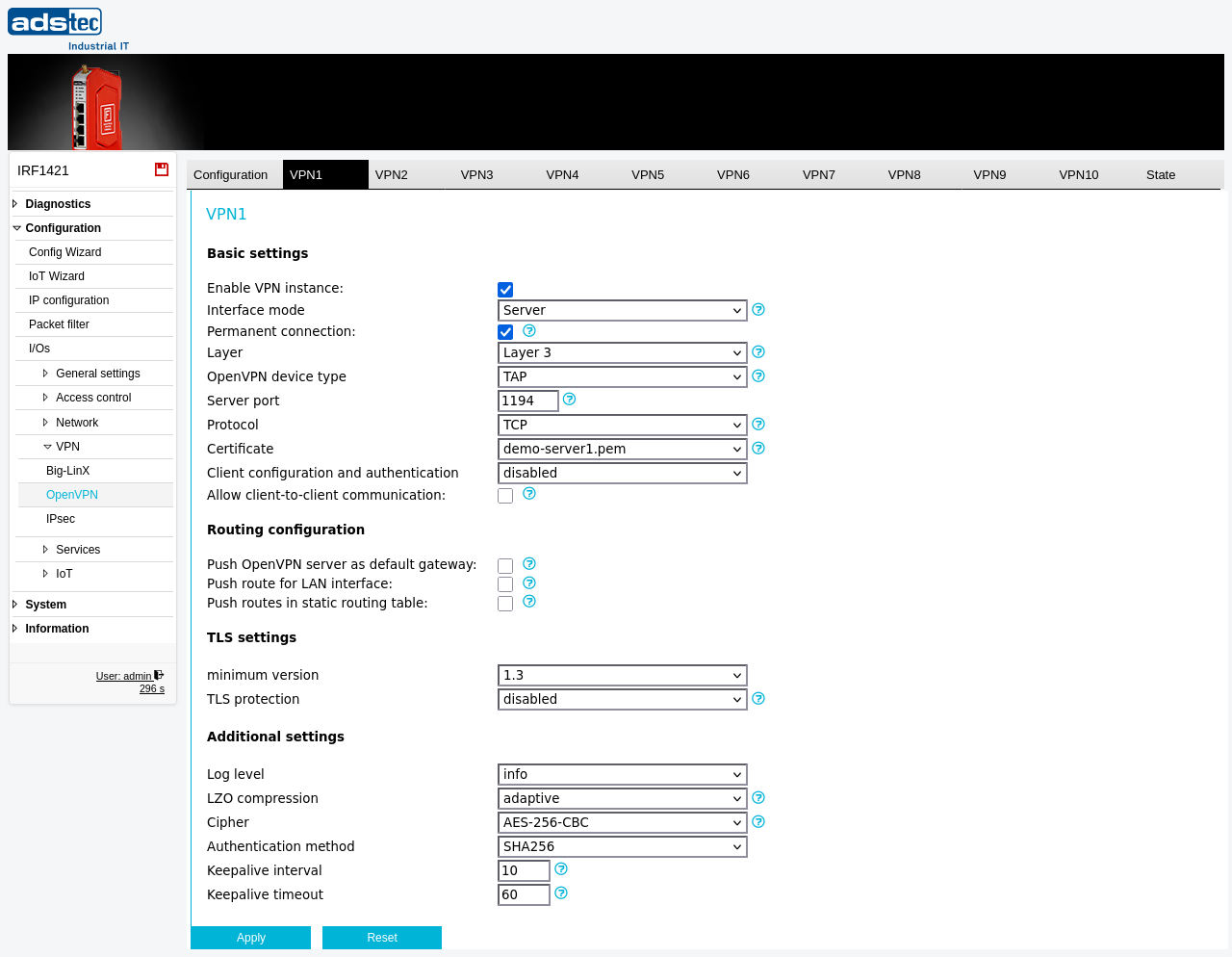
This tab configures one of the device's OpenVPN tunnel instances. It is shown here configured as an OpenVPN server, to which remote clients connect; VPN2 documents the same tab configured as a client. All OpenVPN instances are identical in structure — each can run as a server or a client with its own certificate, protocol, and addressing. For an overview of all configured tunnels and global OpenVPN settings, see the OpenVPN parent page. Changes take effect after clicking Apply, but must be saved persistently via the Save page to survive a reboot.
Prerequisites
- A server certificate suitable for OpenVPN must be uploaded on the Certificates page. The server and all connecting clients must use certificates signed by the same Certificate Authority (CA).
- Plan the tunnel IP addressing so that the VPN subnet does not overlap with existing LAN or WAN subnets. For Layer 3 tunnels, assign the tunnel IP address on the IP configuration page.
Settings
Basic settings
- Enable VPN instance
- Activates or deactivates this VPN tunnel instance. When disabled, the tunnel is not started.
- Interface mode
- Selects the connection mode. In this example it is set to Server: the device runs a TCP/UDP server to which multiple clients can connect. (In Client mode the device connects to a remote server — see VPN2.)
- Permanent connection
- When enabled on a server instance, the server is always active. If disabled, the instance can be started on demand using the VPN KEY, CUT or ALARM triggers, Modbus TCP, or the API.
- Layer
- Selects the network layer on which the OpenVPN interface operates. Layer 2 bridges the VPN interface with the LAN interface. Layer 3 assigns the VPN interface its own IP address, configured on the IP configuration page.
- OpenVPN device type
- Selects the virtual network device type for Layer 3 tunnels, either TUN or TAP (TAP is the default on this device). Both VPN endpoints must use the same device type. TUN connections always use the OpenVPN topology mode subnet; to reach subnets behind clients in TUN mode, iroute entries are required, derived from the routes configured in the server's client configuration table.
- Server port
- The TCP/UDP port the server listens on (e.g., 1194). Each OpenVPN server instance must use a unique port. If a server is enabled on TCP port 443, the HTTPS web server must be disabled on the Web server page to avoid a port conflict.
- Protocol
- The transport protocol for the connection. UDP offers slightly better performance but cannot pass through HTTP proxies and may be blocked by some mobile networks. TCP is the default on this device.
- Certificate
- Selects the server certificate for authentication, uploaded on the Certificates page. Certificates with Extended Key Usage (EKU) fields can be used only as a server certificate (EKU: TLS Web Server Authentication) or only as a client certificate. The server and all its clients must use certificates from the same CA.
- Authenticate with username and password
- Enables additional username/password authentication in addition to the certificate. The Username and Password fields appear when this option is enabled.
Client configuration and authentication
These settings determine how the server assigns addresses to, and authenticates, connecting clients.
- Client configuration and authentication
-
Selects the source of client configuration.
disabled: No address pool is used.
from IP address pool: Connecting clients are assigned addresses from a configured range.
from RADIUS server: Clients are authenticated against a RADIUS server.
from configuration table: Per-client static entries are used.
- First IP address of pool
- The starting address of the pool used to assign IP addresses to connecting clients (shown when the IP address pool is selected). It must lie within the VPN interface subnet and must not overlap with a DHCP server or any other interface.
- Allow client-to-client communication
- Enables the OpenVPN client-to-client option, which controls whether traffic between clients connected to this server instance is permitted.
Routing configuration
- Push OpenVPN server as default gateway
- Enables push redirect-gateway def1, configuring all connected clients to route their default gateway through the VPN connection. The route to the server itself is preserved.
- Push route for LAN interface
- Pushes a route for the local LAN network to all connected clients.
- Push routes in static routing table
- Pushes all entries from the static routing table (configured on the IP routing page) to connected clients.
TLS settings
- minimum version
- Sets the minimum TLS protocol version required for the connection.
- TLS protection
- Adds an HMAC layer on top of the TLS control channel. Available options are tls-auth, tls-crypt, or disabled. When using tls-auth, the OpenVPN direction parameter is set to 0 for server instances. The Static key field appears when this is enabled; the key file is uploaded on the Certificates page.
Additional settings
- Log level
- Controls the verbosity of OpenVPN log messages in the Eventlog.
- LZO compression
- Configures the OpenVPN LZO compression option. No disables compression (default), Yes always enables it, and Adaptive decides dynamically whether compression is beneficial. All VPN endpoints must use the same setting.
- Cipher
- Selects the encryption cipher for the connection. All VPN endpoints must use the same cipher.
- Authentication method
- Selects the HMAC algorithm used for data-channel packet authentication.
- Keepalive interval
- Time in seconds between keepalive ping messages sent to the VPN partner.
- Keepalive timeout
- Time in seconds after which the connection is restarted if no ping packet has been received from the VPN partner.
Client-mode fields
Server address, Remote cert TLS type: server, Pull routes from server, and Use HTTP proxy are shown only when the interface mode is set to Client. They are documented on VPN2.
ATTENTION
Each OpenVPN server instance must use a unique TCP/UDP port. If a server instance is enabled on TCP port 443, disable the HTTPS web server on the Web server page first to avoid a port conflict.
Security
Use strong certificates with adequate key lengths for OpenVPN tunnels. Certificates with Extended Key Usage (EKU) fields prevent server and client certificates from being interchanged. Enable TLS protection (tls-auth or tls-crypt) to add HMAC authentication on the control channel, which helps mitigate denial-of-service attacks. Restrict traffic through the tunnel with Packet filter rules to only the necessary protocols and destinations, in accordance with IEC 62443 zone and conduit requirements.