1:1 NAT
Navigation: Configuration > Network > 1:1 NAT
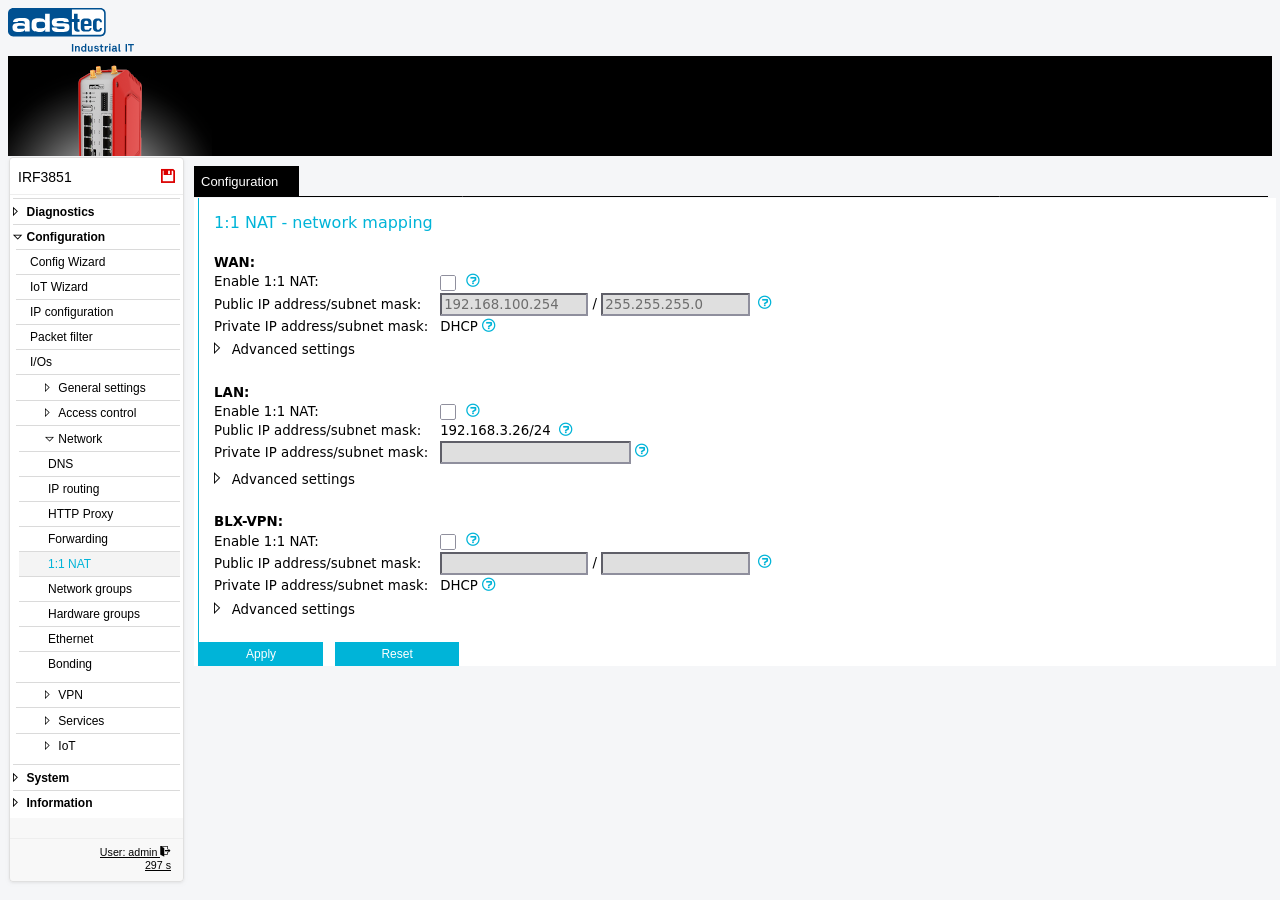
The 1:1 NAT page configures bidirectional network address translation between a public (virtual) subnet and a private (real) subnet on each interface. Unlike standard NAT (masquerading), which translates many internal addresses to a single external address, 1:1 NAT performs a one-to-one mapping of the entire subnet: the network prefix is replaced while the host portion of each address is preserved. This is particularly useful when multiple LAN segments use identical IP address ranges — for example, when several identical machines are connected to different LAN ports in extended IP router mode. Each segment can retain its original addressing while being uniquely reachable through its assigned public subnet. The public subnet and the interface IP address are defined on the IP configuration page; this page controls only the private-to-public mapping and the enable/disable state per interface.
Prerequisites
- The device must be operating in IP router mode. 1:1 NAT is not available in transparent bridge mode. Configure the operational mode on the IP configuration page.
- The public IP address and subnet mask for each interface must be configured on the IP configuration page before enabling 1:1 NAT.
- The private subnets must not conflict with the public subnets assigned to any interface. While multiple private subnets may use identical address ranges, they must each map to a unique public subnet.
- When referencing 1:1 NAT-translated addresses in Packet filter rules or Forwarding rules, use the public (virtual) addresses, as translation occurs before filtering.
Settings
The page is divided into interface-specific sections. Each section provides the same set of fields for the corresponding interface. Depending on the device model and configuration, the available sections are WAN, LAN, and BLX-VPN (Big-LinX VPN).
WAN
- Enable 1:1 NAT
- Activates 1:1 NAT on the WAN interface. When enabled, traffic crossing this interface is translated between the public subnet and the private subnet. This allows devices on the WAN side to be addressed via the public subnet while retaining their real private IP configuration.
- Public IP address/subnet mask
- Displays the public interface IP address and subnet mask as defined on the IP configuration page. If DHCP is enabled on this interface, you must define a network to which the IP address received via DHCP will be mapped.
- Private IP address/subnet mask
- The private (real) subnet connected to this interface, specified as the device IP address with subnet mask in CIDR notation (e.g.,
192.168.0.10/24). This means the device itself is reachable as 192.168.0.10 from the private subnet 192.168.0.0/24. When DHCP is used, this value is derived automatically from the DHCP lease.
LAN
- Enable 1:1 NAT
- Activates 1:1 NAT on the LAN interface. When enabled, traffic crossing this interface is translated between the public subnet and the private subnet defined below.
- Public IP address/subnet mask
- Displays the public interface IP address and subnet mask as defined on the IP configuration page. If DHCP is enabled on this interface, you must define a network to which the IP address received via DHCP will be mapped.
- Private IP address/subnet mask
- The private (real) subnet connected to this interface, specified as the device IP address with subnet mask in CIDR notation (e.g.,
192.168.0.10/24). This means the device itself is reachable as 192.168.0.10 from the private subnet 192.168.0.0/24.
BLX-VPN
- Enable 1:1 NAT
- Activates 1:1 NAT on the Big-LinX VPN interface. When enabled, traffic arriving through the Big-LinX VPN tunnel is translated between the public subnet and the private subnet. This is useful when remote maintenance access should use virtual addresses rather than the real private addresses of the connected machines.
- Public IP address/subnet mask
- Displays the public interface IP address and subnet mask as defined on the IP configuration page. If DHCP is enabled on this interface, you must define a network to which the IP address received via DHCP will be mapped.
- Private IP address/subnet mask
- The private (real) subnet connected to this interface, specified as the device IP address with subnet mask in CIDR notation (e.g.,
192.168.0.10/24). This means the device itself is reachable as 192.168.0.10 from the private subnet 192.168.0.0/24. When DHCP is used, this value is derived automatically from the DHCP lease.
ATTENTION
The private subnets may use identical address ranges across different interfaces, but they must not conflict with the public subnets. If a private subnet overlaps with a public subnet, address translation cannot function correctly and network connectivity may be disrupted. When the public and private subnets have different sizes, the device uses the smaller subnet for the mapping range.
Security
When using 1:1 NAT for remote maintenance via Big-LinX, remote users access machines through virtual public addresses rather than real private addresses. Review Packet filter rules to ensure they reference the correct public (virtual) addresses, since NAT translation occurs before packet filtering. Restrict the translated address ranges to the minimum required scope to limit the attack surface in accordance with IEC 62443 network segmentation principles.