IPsec
Navigation: Configuration > VPN > IPsec
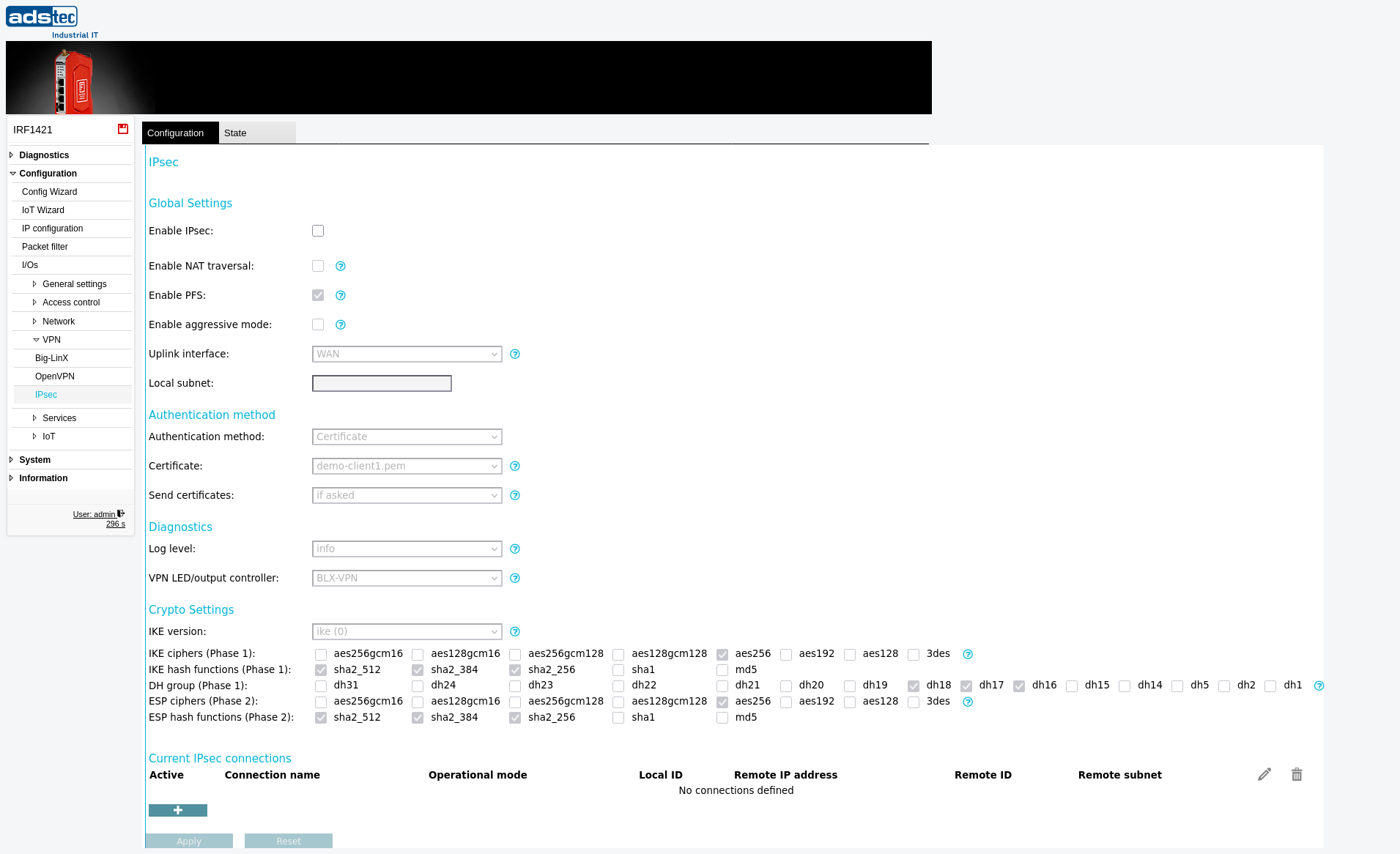
The IPsec page configures encrypted site-to-site or host-to-site VPN tunnels using the IPsec protocol suite. IPsec encrypts all traffic between the device (or a defined local subnet) and a remote peer (or a defined remote subnet), providing confidentiality and integrity for data traversing untrusted networks. The page supports both Pre-Shared Key (PSK) and certificate-based authentication, IKEv1 and IKEv2 key exchange, and configurable cipher suites for Phase 1 (IKE) and Phase 2 (ESP). Multiple IPsec connections can be configured simultaneously. Changes take effect after clicking Apply settings, but must be saved persistently via the Save page to survive a reboot. The connection status can be monitored on the State tab of this page and via the System State page.
Prerequisites
- The device must be operating in IP router mode. Configure the operational mode on the IP configuration page.
- For certificate-based authentication, upload the required device certificate and CA certificate on the Certificates page before configuring the IPsec connection.
- Ensure the remote peer's IP address, authentication credentials (PSK or certificate), and subnet definitions are known before configuration.
- If traffic must pass through the IPsec tunnel, verify that the Packet filter permits the relevant traffic flows between the local and remote subnets.
- If required, configure static routes on the IP routing page to direct traffic into the tunnel.
Settings
General
- Enable IPsec
- Enables the IPsec VPN function on the device. When enabled, the device can establish encrypted tunnels with remote IPsec peers.
- Enable NAT traversal
-
Enables NAT traversal (NAT-T), which is required when a router performing Network Address Translation (NAT) is located between the local device and the remote peer. NAT-T encapsulates IPsec packets in UDP to allow them to pass through NAT devices.
Note: IPsec pass-through on an intermediate router will break NAT traversal. If the intermediate router supports IPsec pass-through, it must be disabled when NAT traversal is used.
- Enable PFS
- Enables Perfect Forward Secrecy (PFS). With PFS, a temporary session key (signed by the private key) is used to encrypt the data instead of the private key itself. This session key is renewed at short intervals. If the private key is later compromised, previously captured traffic cannot be decrypted because the temporary session keys cannot be reconstructed. PFS provides an additional layer of security.
- Enable aggressive mode
- Enables IPsec aggressive mode for IKEv1 Phase 1 negotiation. In aggressive mode, fewer messages are exchanged during connection setup, which may be required for interoperability with certain remote peers.
Connection
- Operational mode
-
Defines the connection behavior of the local device.
Active: The device immediately attempts to establish the connection and periodically retries if the attempt fails. This is the standard mode for site-to-site tunnels.
Active (switched): Connection setup is triggered via a key switch input on the device.
Passive: The device does not initiate a connection but waits for the remote peer to connect. This mode is required when the remote IP address is unknown in advance, such as in a road warrior setup.
- Uplink interface
- Selects the network interface on which the IPsec tunnel is established. The tunnel traffic exits and enters the device through this interface.
- Local subnet
-
The local subnet whose traffic to the remote subnet is encrypted when sent via the selected uplink interface. Enter the subnet in CIDR notation (e.g., 192.168.0.0/24). If no subnet is specified, the IP address of the uplink interface itself is used.
Note: The local and remote subnets must not be identical. Only traffic between exactly the defined local and remote subnets is encrypted. Routed traffic passing through the device from other networks behind it is not encrypted unless those networks are explicitly specified as the local subnet.
- Local ID
- The identity string this device uses to identify itself during PSK-based connections. This is used for identification, not authentication. When certificate-based authentication is used, the certificate information is always used as the identity. If this field is left empty, the IP address of the local interface is used. Entering the IP address explicitly is not the same as leaving the field empty. Spaces are not permitted.
- Remote IP address
-
The IP address or hostname of the remote IPsec peer. Enter
*to accept connections from any remote IP address. This setting is only meaningful when the operational mode is set to Passive, allowing the device to accept connections from peers with dynamic or unknown addresses. When both the remote IP address and remote subnet are set to*, a road warrior setup is defined in which multiple remote peers (e.g., traveling laptops) can connect simultaneously.Note: If a road warrior connects through a router (from a LAN), NAT traversal is required and the remote LAN must use a private address range (10.0.0.0/8, 192.168.0.0/16, or 172.16.0.0/12).
- Remote ID
-
The identity string used by the remote peer for identification (not authentication), depending on the chosen authentication method.
PSK: If left empty, the remote side's IP address is verified. Entering the IP address is not the same as leaving the field empty. The remote ID must not contain spaces.
Certificate: The complete certificate information of the remote peer must be specified (e.g., C=..., ST=..., L=..., O=..., OU=..., CN=..., E=...). The order of elements must be maintained and all elements separated by a comma followed by a space. When waiting for road warriors using certificates, the wildcard
*can be used (e.g., CN=*). For a road warrior setup with PSK, no IDs should be configured.Note: The remote ID must be unique. If multiple connections share the same ID, their tunnels will be periodically established and torn down, resulting in intermittent connectivity.
- Remote subnet
-
The remote subnet to which traffic from the local subnet is encrypted. Enter the subnet in CIDR notation (e.g., 192.168.0.0/24). If no subnet is specified, the IP address of the remote peer is used.
Note: The local and remote subnets must not be identical. Only traffic between exactly the defined local and remote subnets is encrypted. Routed traffic from networks behind the devices is not encrypted unless those networks are explicitly defined.
Authentication
- Authentication method
- Selects the method used to authenticate the IPsec connection. Either a Pre-Shared Key (PSK) or certificates can be used. Certificate-based authentication is recommended as it provides stronger security than PSK.
- PSK
-
The Pre-Shared Key used to authenticate the tunnel. The PSK must be identical on both sides of the connection. The key can be provided in the following formats:
Standard character sequence: Alphanumeric characters (a-z, A-Z, 0-9) and the special characters
- + & ! @ # $ % ^ * ( ) , . : ; _ = < > { } /. Maximum length: 64 characters.Hexadecimal format: Must start with
0xfollowed by hexadecimal digits (0-9, a-f, A-F). Represents up to 64 bytes (maximum 128 hex digits after0x).Base64 format: Must start with
0sfollowed by Base64-encoded characters. Represents up to 64 bytes (maximum 88 Base64 characters after0s).Important: Do not use simple words or phrases. The PSK should be a strong, random value.
- Certificate
- Selects the device certificate used to authenticate this side of the IPsec connection to the remote peer. Certificates can be uploaded on the Certificates page.
- CA certificate
- Selects the Certificate Authority (CA) certificate used to verify the remote peer's certificate. The remote peer's certificate must have been signed by this CA to be accepted.
- Send certificates
-
Controls when the device sends its certificate to the remote peer.
on demand: Certificates are sent only when requested by the remote peer. This is the default and recommended setting for security reasons.
always: Certificates are always sent during negotiation. This may be required for compatibility with certain vendors such as Cisco or Safenet.
IKE and Encryption
- IKE version
-
Selects the IKE (Internet Key Exchange) protocol version used for key negotiation.
ike (0): Accepts both IKEv1 and IKEv2 as a responder, and initiates connections actively with IKEv2.
ikev1 (1): Uses IKEv1 (also known as ISAKMP) exclusively.
ikev2 (2): Uses IKEv2 exclusively.
- IKE ciphers (Phase 1)
- Selects the encryption algorithms offered during IKE Phase 1 negotiation. Multiple ciphers can be selected. Available options include aes256, aes192, aes128, and 3des. Both sides must support at least one common cipher for the negotiation to succeed.
- IKE hash functions (Phase 1)
- Selects the hash algorithms offered during IKE Phase 1 negotiation for integrity verification. Available options include sha2_512, sha2_384, sha2_256, sha1, and md5. Both sides must support at least one common hash function.
- DH group (Phase 1)
-
Selects the Diffie-Hellman groups offered for key exchange during IKE Phase 1. Higher group numbers provide stronger key exchange but require more computational resources. The available groups and their corresponding modular exponentiation (MODP) sizes are:
dh24: MODP 2048 (subgroup 256) | dh23: MODP 2048 (subgroup 224) | dh22: MODP 1024 (subgroup 160) | dh18: MODP 8192 | dh17: MODP 6144 | dh16: MODP 4096 | dh15: MODP 3072 | dh14: MODP 2048 | dh5: MODP 1536 | dh2: MODP 1024 | dh1: MODP 768
- ESP ciphers (Phase 2)
- Selects the encryption algorithms offered during ESP Phase 2 negotiation for the actual data encryption. Available options include aes256, aes192, aes128, and 3des.
- ESP hash functions (Phase 2)
- Selects the hash algorithms offered during ESP Phase 2 negotiation for data integrity verification. Available options include sha2_512, sha2_384, sha2_256, sha1, and md5.
Diagnostics and Monitoring
- Log level
-
Controls the verbosity of IPsec log messages written to the Eventlog.
none: No IPsec messages are logged.
info: Only basic information and critical errors are logged.
debug: State information for troubleshooting is also logged.
verbose: All possible messages are logged.
- VPN LED/output controller
- Selects which VPN interface controls the state of the VPN LED indicator and the digital output function VPNUP. The LED indicates the connection state: off — connection disabled; blinking — connection is being established; on — connected.
Current IPsec connections
This table displays all currently configured IPsec connections with their status, connection name, operational mode, local ID, remote IP address, CA certificate, remote ID, and remote subnet. Connections can be deleted from this table using the trash icon.
Add new connection
Use this section to add a new IPsec connection. Enter the connection parameters (operational mode, local ID, remote IP address, CA certificate, remote ID, and remote subnet) and click Add entry to create the connection.
ATTENTION
Only traffic between exactly the configured local and remote subnets is encrypted. Routed traffic passing through the device from other networks is not automatically encrypted. Verify that the local and remote subnet definitions cover all traffic that must be protected. If subnets are left empty, only traffic originating from and destined to the device itself is encrypted — traffic routed through the device from networks behind it remains unencrypted.
Security
Use certificate-based authentication instead of Pre-Shared Keys wherever possible, as certificates provide stronger security and allow individual revocation. If PSK is required, use a strong, randomly generated key of maximum length — do not use dictionary words or simple phrases. Enable Perfect Forward Secrecy (PFS) to protect past sessions even if the private key is later compromised. Prefer IKEv2 over IKEv1 for improved security and reliability. Select strong cipher suites: use AES-256 for encryption and SHA-256 or higher for hashing. Avoid weak algorithms (3DES, MD5, SHA-1, DH groups 1 and 2) in production environments. Restrict the Packet filter to permit only the necessary traffic through the IPsec tunnel. Review IPsec connection configurations regularly and remove unused connections to reduce the attack surface in accordance with IEC 62443.